

Writesonic Review 2026: Is It Worth It for Freelancers?
Quick Verdict
Most freelancers who try Writesonic fall into one of two camps. The first group opens it, generates a mediocre draft in two minutes, and dismisses it as another overhyped AI tool. The second group spends a week building it into their workflow, cuts their drafting time by 60 percent, and quietly stops telling competitors about it. The difference is not the tool. It is how they use it. This Writesonic review exists for one reason: to get you into the second camp. We break down exactly what Writesonic does, where it earns its price, and the specific use cases where it will save you real hours every single week – and the ones where it will waste your time.

Our Overall Rating: 4.0 out of 5
| Category | Score |
|---|---|
| Ease of Use | 4.5/5 |
| AI Output Quality | 4.0/5 |
| Content Variety | 4.5/5 |
| Value for Money | 4.0/5 |
| SEO Features | 3.5/5 |
| Integrations | 3.5/5 |
| Customer Support | 3.5/5 |
| Overall | 4.0/5 |
How to Get Started with Writesonic
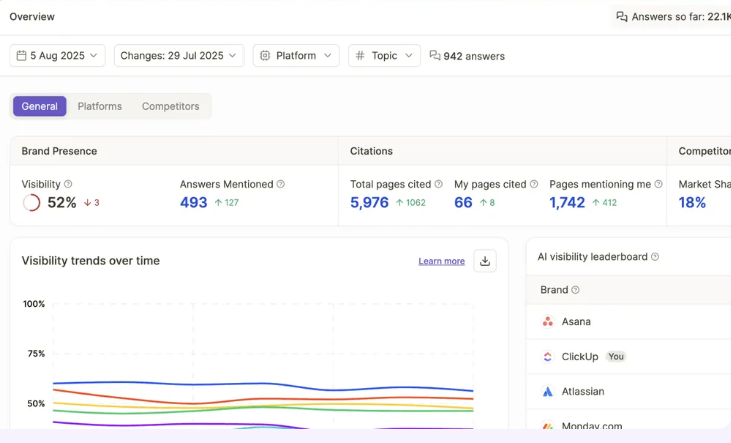
Getting started with Writesonic is straightforward, and that is one of the platform’s genuine strengths. You sign up, choose a plan, and within minutes you are producing content. Unlike tools that demand heavy configuration before delivering value, Writesonic lets you move fast from day one. The interface is clean, the navigation is logical, and the learning curve is shallow enough that freelancers who have never used an AI writing tool before can get productive quickly.
The smart approach for freelancers is to spend the first session exploring which tools inside Writesonic match your actual work. The platform covers a wide range of use cases – long-form articles, short ad copy, social media content, product descriptions, email sequences, and more. Identifying the two or three features that map to your client work will save you from feeling overwhelmed by the full template library. Writesonic’s Article Writer is the feature most relevant to content freelancers and deserves your immediate attention.
If you dive in without a clear workflow in mind and start bouncing between templates hoping something clicks, you will underuse what the platform offers. Writesonic is a volume tool at its core. It rewards freelancers who come in with clear briefs, tight prompts, and a systematic approach to content production. Used with that mindset, it delivers.
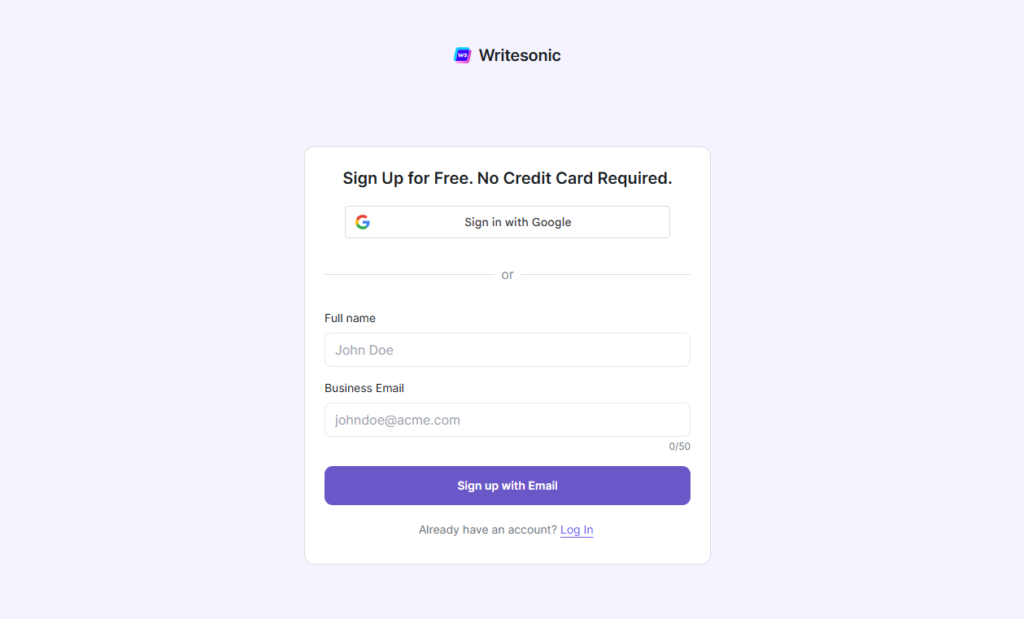
How to Sign Up and Use Writesonic: Step-by-Step
Step 1: Go to Writesonic.com and Click “Get Started”
Head to writesonic.com and click the Get Started button in the top right corner. You will be taken to the signup page. No credit card is required for the free plan – you can be inside the platform in under two minutes.
Step 2: Create Your Account
On the signup screen, you have two options: sign up with Google (the fastest route) or enter your full name and business email address manually and click Sign up with Email. If you go the email route, check your inbox for a verification link and click it to activate your account. The whole process takes about 60 seconds.
Step 3: Choose Your Plan
After verifying your account, Writesonic will prompt you to choose a plan. Select Free to start exploring with no commitment. The free tier gives you access to core tools including Article Writer and Chatsonic with a monthly word limit. You can upgrade at any time once you have decided the platform fits your workflow.
Step 4: Set Up Your Workspace
Once inside the dashboard, you will land in your main workspace. Take two minutes to fill in your brand name and select your default language and tone of voice in the settings. These defaults get applied to every piece of content you generate, so setting them correctly upfront saves you from adjusting them on every individual output.
Step 5: Write Your First Article with Article Writer 6.0
In the left sidebar, click AI Article Writer. Enter your article topic in the input field and add your primary keyword. Choose your desired word count, tone, and language. Click Generate. Writesonic will first suggest a set of titles – pick the one that fits or edit it, then approve the auto-generated outline. You can rearrange, add, or delete sections before proceeding. Click Generate Article and your full draft will be ready in under a minute.
Step 6: Edit and Refine Your Draft
Once the draft is generated, review it inside the Writesonic editor. Use the Rewrite option on any paragraph that feels off, or highlight a sentence and use inline editing commands to adjust tone or length. When you are satisfied, copy the content into your preferred document editor – Google Docs, Notion, or your CMS – for final polish and formatting before delivery.
Step 7: Explore Chatsonic for Research
Once you are comfortable with Article Writer, open Chatsonic from the sidebar. This is your AI research assistant with live web access. Ask it to find recent statistics on your topic, summarise a competitor article, suggest an article angle you have not covered, or generate a content brief. Because Chatsonic can pull current information from the web, it is particularly useful for topics that require up-to-date data rather than relying on static training knowledge.
Step 8: Use Templates for Other Content Types
Click Templates in the sidebar to access Writesonic’s full library of over 100 content formats. Find the template that matches your next task – whether that is an email subject line, a LinkedIn post, a product description, or an ad headline – fill in the context fields, and generate. Each template is a standalone tool optimised for that specific content format, so outputs are tighter and more on-target than asking a general AI to produce the same thing from a blank prompt.
My First Week Using Writesonic: An Honest Account
I want to be upfront about how this started. I did not pick up Writesonic out of curiosity. I picked it up out of desperation.
It was a Tuesday in late January. I had four blog posts due by Friday, a client who had just added a fifth at the last minute, and a creative tank running on empty. I had been hearing about Writesonic for months – mostly from other freelancers in forums, usually in the context of “I use it for drafts, not for finished work” – and I figured that week was as good a time as any to find out if that was actually true.
The signup took about ninety seconds. I was inside the dashboard before my coffee had cooled. That part impressed me immediately. I opened Article Writer, typed in my first topic – a 1,500-word guide on email marketing automation for small businesses – added the keyword, picked a tone, and hit Generate. Fifty-three seconds later I had a complete draft in front of me. It was not perfect. The introduction was generic, two of the subheadings were almost identical in scope, and one paragraph had a statistic I could not verify. But the structure was solid. The bones were there. I edited it in about twenty minutes and sent it to the client that afternoon.
That was the moment I understood what Writesonic actually is. It is not a writing replacement. It is a scaffolding machine. It builds the frame fast so you can spend your time on the work that actually requires your brain – the angle, the voice, the detail, the accuracy. By Thursday I had all five posts drafted. I had never hit a week like that before without feeling completely wrecked by Friday.
That said, the first week was not without friction. I made mistakes that cost me time I did not have. I share them below because they are the same mistakes almost every freelancer makes the first time they sit down with Writesonic – and they are all entirely avoidable.
Writesonic: An Overview
To put this Writesonic Review in context: Writesonic launched in 2021 as a GPT-powered writing assistant built to help marketers and content creators produce copy faster. By 2026, the platform has evolved considerably beyond its origins. Today, Writesonic is a broad AI content platform that includes long-form article generation, an AI chatbot called Chatsonic, a website and chatbot builder called Botsonic, AI image generation through Photosonic, and a growing suite of SEO and marketing tools.
Writesonic has built a user base across more than 150 countries and has positioned itself as one of the more accessible AI writing tools on the market. In 2026, the platform sits in an interesting position. It is not trying to compete with Jasper at the enterprise brand intelligence level, nor is it aiming to be a general-purpose AI assistant like ChatGPT. Its clearest positioning is as a high-volume content production tool for writers, marketers, and freelancers who need to produce large amounts of acceptable-quality copy efficiently.
For freelancers, that positioning matters. Writesonic is not the best tool for every writing job. But for specific workflows – particularly bulk article production, programmatic content, and rapid drafting – it has a strong case to make. Understanding what Writesonic is designed to do, rather than measuring it against a tool with entirely different design goals, is essential for evaluating whether it fits your practice.
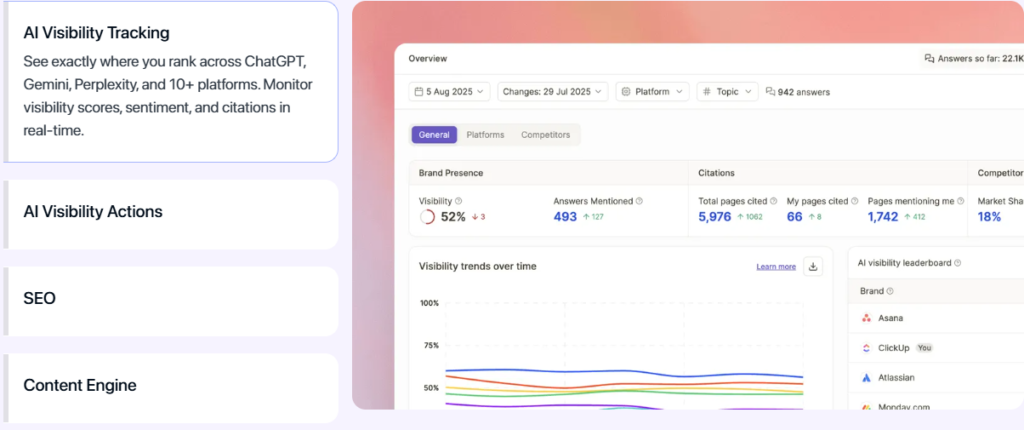
Writesonic Key Features
The Writesonic feature set is extensive, and not all of it is equally relevant for freelancers. The following covers what actually matters for the typical content freelancer workflow in 2026.
Article Writer 6.0
Article Writer 6.0 is the headline feature and the reason most freelancers come to Writesonic. You provide a topic, keyword, and a few contextual details, and the tool generates a full-length SEO-optimised article. In testing, the output quality is genuinely competitive for informational content. Headlines are structured sensibly, introductions establish clear context, and the body sections cover relevant ground without excessive repetition.
The limitation is that Article Writer 6.0 produces generic drafts by default. Without strong input prompts and careful post-generation editing, the content has a recognisable AI texture – factually acceptable but lacking the specificity and voice that distinguishes strong freelance writing. For freelancers who understand how to work with AI drafts rather than simply delivering them unchanged, Article Writer 6.0 is a powerful production accelerator. For those expecting finished, client-ready copy out of the box, it will disappoint.
Chatsonic
Chatsonic is Writesonic’s AI chat assistant, similar in concept to ChatGPT but with one significant added capability: it can access the web in real time. For freelancers who rely on current information in their content – market trends, recent news, updated statistics – this is a meaningful advantage over AI tools that work only from static training data. Chatsonic can pull in live context and reference it in responses, which makes it more useful for research-adjacent tasks than standard AI chat tools.
In practice, Chatsonic works best as a research aid and idea generation tool rather than a primary drafting assistant. It is conversational, responsive, and able to work through complex topic angles with reasonable depth. Where it falls short is in producing extended, structured content that matches the quality of tools designed specifically for long-form writing. Use Chatsonic for research, angle development, and brief building, then move to Article Writer for actual draft production.
AI Article Summariser and Rewriter
The Summariser and Rewriter tools deserve attention for a specific freelance use case: repurposing existing content. If a client needs an older article refreshed, a white paper condensed into a blog post, or a competitor article rewritten in their own voice, these tools reduce the manual effort substantially. The Summariser produces clean, accurate digests of long-form input. The Rewriter handles tone adjustments and structural reworks with reasonable consistency. Neither tool is perfect on the first pass, but both accelerate work that would otherwise be tedious.
SEO Mode and Keyword Integration
Writesonic’s SEO mode allows you to input a target keyword before generating content, and the tool attempts to optimise density and placement accordingly. The integration is useful for basic on-page SEO requirements, though it does not match the depth of a dedicated SEO content tool like Surfer or Frase. For freelancers who produce moderate-volume content with standard SEO requirements, the built-in SEO mode covers the basics adequately. For client work with competitive keyword targets and precise optimisation requirements, you will likely still want a dedicated SEO tool running in parallel.
Templates Library
Writesonic provides over 100 templates covering virtually every content type a freelancer is likely to encounter. Product descriptions, email subject lines, social media captions, ad copy, press releases, LinkedIn articles, YouTube scripts, landing page copy – the breadth is impressive. The template quality varies, but having structured starting points for unfamiliar content formats is genuinely useful, particularly for freelancers expanding into new content categories.
Using Writesonic to Create Content
This is where Writesonic’s 2026 offering becomes most relevant for freelancers, and where the contrast with pricier, more complex tools becomes most visible. Writesonic does not require extensive configuration to produce usable output. You open the Article Writer, provide your topic and target keyword, adjust a few settings – content length, tone, language – and generate. For a freelancer running on tight deadlines, that simplicity is a real advantage.
The Article Writer workflow is the closest Writesonic gets to a complete content production environment. You start with a topic input, receive a title suggestion and outline, approve or edit the structure, then generate the full draft. The process is faster than most competing tools for similar output quality at the standard tier. A 1,500-word first draft can be produced in under five minutes, which is a meaningful time saving when you are billing by project rather than by hour.
Where the workflow breaks down is at the editing stage. Writesonic’s editor is functional but limited. The inline editing tools are basic, the formatting options are minimal, and there is no native plagiarism checker. Freelancers who want to do substantive post-generation work inside the platform will find themselves fighting the interface. The practical approach is to treat Writesonic as a draft generation engine and move to your preferred document editor for refinement. This adds a workflow step that more integrated tools avoid, but it is a manageable friction for most use cases.
For long-form SEO articles, Writesonic’s performance is most competitive when the content type is informational and the audience expectations are moderate. Explainer articles, how-to guides, listicles, and product roundups all respond well to the Article Writer approach. Thought leadership pieces, deeply researched analysis, and content requiring strong original voice need more editorial work after generation, and the platform’s output quality gap relative to human writing is more visible in those cases.
Writesonic Pricing (2026)
Writesonic’s pricing structure has evolved significantly and in 2026 is considerably more competitive than it was in its early iterations. The platform has moved away from a word-count credit model toward a seat-based subscription, which is more predictable for freelancers who produce content at consistent volume.
The Free plan provides access to a limited set of tools and a meaningful but capped monthly word generation allowance. For freelancers evaluating the platform, the Free plan provides enough scope to assess Article Writer quality and Chatsonic functionality without financial commitment. The generated word limit is restrictive for production use but sufficient for an honest trial.
The Individual plan covers most freelance use cases at a monthly subscription price that undercuts most comparable AI writing tools. It includes full access to Article Writer 6.0, the complete template library, Chatsonic with web access, AI image generation, and unlimited generation within fair use limits. For freelancers producing regular content volume for clients, the Individual plan provides solid return on investment if the tool is used consistently.
The Teams plan adds collaboration features, higher usage limits, and priority support, relevant for freelancers who have grown into small content agencies or who collaborate with other writers on client accounts. Custom Enterprise pricing is available for organisations with specific integration, compliance, or volume requirements.
Is Writesonic Worth It for Freelancers?
The honest answer from this Writesonic Review: yes, for the right type of freelancer. Writesonic delivers clear value for writers who produce content at volume, work on informational content categories, and are comfortable using AI drafts as starting points rather than finished deliverables. The price-to-productivity ratio is genuinely strong at the Individual tier, making it one of the more accessible investments a freelance content writer can make in 2026.
The answer shifts for freelancers whose primary work involves brand-critical content, specialist subject matter requiring deep research, or clients with strict voice and quality requirements. In those contexts, Writesonic’s output needs more editorial work to reach a standard that justifies the efficiency gain. The ROI calculation becomes less clear, and tools with stronger customisation and quality control features may serve those workflows better.
Writesonic Pros and Cons for Freelancers
What Writesonic Does Well
- Fast, accessible content generation with a shallow learning curve that gets freelancers productive immediately without heavy configuration.
- Article Writer 6.0 produces competitive first drafts for informational content types, delivering genuine time savings for volume content workflows.
- Chatsonic’s real-time web access gives freelancers a research advantage over AI tools limited to static training data.
- The template library breadth covers virtually every content format a freelancer is likely to encounter across client work.
- Pricing is competitive and predictable. The Individual plan offers strong value relative to comparable tools, particularly for freelancers who generate consistent content volume.
- Multilingual support is strong, making Writesonic genuinely useful for freelancers serving international clients or producing content in multiple languages.
Where Writesonic Falls Short
- Output quality without strong prompt engineering is average. The platform does not compensate for weak input, and generic prompts produce generic copy.
- The editing environment is limited. Post-generation refinement is more efficiently done in a separate editor, adding a workflow step that more integrated platforms avoid.
- There is no native plagiarism checking, which is a meaningful omission for freelancers who need to verify originality before client delivery.
- Brand voice customisation is less sophisticated than specialist tools. Consistent voice maintenance across large content volumes requires manual discipline rather than system-level enforcement.
- SEO optimisation tools are adequate for basic requirements but fall short of dedicated SEO content platforms for competitive keyword targeting.
- Content accuracy requires verification. Writesonic, like all AI writing tools, generates plausible-sounding text that is not always factually reliable, requiring a human accuracy review before publication.
Common Challenges with Writesonic (And How to Overcome Them)
Every freelancer who gets deep into a Writesonic Review of their own workflow long enough runs into the same walls. Here are the ones that actually matter – and the exact fixes that work.
Challenge 1: The First Draft Feels Generic
What happens: You generate an article, read the first paragraph, and feel a sinking sense that it could have been written about anything. The content is technically accurate but has no edge, no personality, and no reason to exist over the thousand other articles on the same topic.
Why it happens: You gave Writesonic a broad topic and a keyword and expected it to make creative decisions for you. It cannot. The AI has no idea what angle your client wants, who their audience is, or what makes their brand different. It defaults to the statistical centre of the internet – average.
The fix: Before you hit Generate, write two or three sentences in the context field that describe the specific angle, the target reader, and one thing that makes this article different from the standard take. Treat the context box as a mini brief, not a formality. The quality difference between a vague input and a sharp one is night and day. Spend three minutes on the brief and save twenty on the edit.
Challenge 2: Stats and Facts That Cannot Be Verified
What happens: You are editing a draft and you hit a sentence like “according to a 2024 study, 73% of consumers prefer…” – and when you go to verify it, you cannot find the source. Or the study does not exist.
Why it happens: Like all large language models, Writesonic sometimes generates plausible-sounding statistics that are either outdated, misattributed, or entirely fabricated. It is not trying to mislead you – it is pattern-matching from training data, and statistical claims are part of that pattern.
The fix: Build a one-pass fact-check into your post-generation workflow for every piece of content. Flag any specific number, study reference, or named statistic and verify it before delivery. Use Chatsonic with web access to quickly cross-check claims – it can pull current sources far faster than a manual search. Alternatively, remove specific statistics from the AI draft and replace them with verified data you source yourself. This step adds five to ten minutes per article and protects your professional reputation every time.
Challenge 3: The Editor Feels Limiting After a While
What happens: You are trying to restructure a section, move paragraphs around, add a callout box, or do any kind of nuanced formatting – and the Writesonic editor keeps getting in the way. It is not built for heavy document work.
Why it happens: Writesonic’s editor is designed for generation and light editing, not as a full document workspace. It was never meant to replace Google Docs or Notion.
The fix: Stop fighting it. Accept that Writesonic is your draft engine, not your editing environment. Generate in Writesonic, export or copy to your document editor of choice, and do all structural and formatting work there. Once you let go of the idea that everything has to happen inside one tool, the workflow becomes much smoother and faster.
Challenge 4: Outputs Start Feeling Repetitive Across Projects
What happens: After a few weeks of using Writesonic regularly, you start noticing patterns. Certain sentence constructions appear repeatedly. Introductions follow the same structure. The AI has a recognisable rhythm, and once you hear it, you cannot unhear it.
Why it happens: You are using the same tone settings and the same input style every time. Writesonic is producing the same type of output because you are asking for the same type of output.
The fix: Rotate your tone settings deliberately across different projects. Try Witty for one article, Informative for the next, Persuasive for a third. Use the Rewrite tool on the sections that feel most formulaic, and give it a specific instruction – “rewrite this as if a sceptical expert is making the point.” Treating the tone settings as tools rather than defaults gives you a much wider range of output from the same underlying system.
Challenge 5: Clients Can Tell It Was AI-Written
What happens: A client pushes back. The content is “fine” but it sounds like AI. They want something that sounds more human, more specific, more like their brand.
Why it happens: You delivered a draft that had too much Writesonic in it and not enough of you. The AI did the structural work and you approved it without putting your own voice and detail into the copy.
The fix: Never deliver a Writesonic draft unchanged. The tool’s job is to give you 70 percent of the article quickly. Your job is to do the 30 percent that makes it genuinely good – the specific examples, the client’s brand phrases, the real-world detail that no AI has access to. If you are consistently hearing “this sounds like AI,” that is a signal to increase your editorial contribution, not to abandon the tool. Use Writesonic to save time on structure and first-pass prose. Spend that saved time on the parts that require a real writer.
Writesonic vs. Competing AI Writing Tools
The most relevant comparison for Writesonic in 2026 is against Jasper, Copy.ai, and Rytr, all of which occupy parts of the same market. Against Jasper, Writesonic is faster to set up, more affordable, and better suited to freelancers who want immediate productivity without a configuration investment. Jasper’s Brand Voice and enterprise-grade knowledge base features produce more consistent, higher-quality output for complex brand work – but that advantage requires significant setup time and comes at a substantially higher price point.
Against Copy.ai, Writesonic’s Article Writer is meaningfully stronger for long-form content production. Copy.ai’s strength lies in short-form and workflow automation, making it a better fit for freelancers focused on marketing copy rather than article production. Against Rytr, Writesonic offers more capability at a comparable price, though Rytr remains a solid budget option for freelancers with modest generation requirements.
The honest positioning for Writesonic in 2026 is this: it is the best high-value option for freelancers who prioritise speed, breadth, and accessibility over depth of brand customisation or enterprise-grade quality control. If your work involves producing high volumes of SEO content for clients who need good rather than exceptional, Writesonic is difficult to beat at its price point. If your work requires exceptional, you will likely need to spend more and invest more time in setup with a more sophisticated platform.
Who Should Use Writesonic in 2026
Writesonic makes the most sense for freelancers who produce informational blog content, SEO articles, and marketing copy at volume. Writers who serve multiple clients across varied topics and need to move quickly between different subject areas will find the platform’s breadth genuinely useful. Chatsonic’s web access makes it particularly valuable for freelancers whose content requires current information rather than static reference material.
Freelancers who are new to AI writing tools will find Writesonic one of the most accessible entry points available. The interface does not require technical knowledge, the templates reduce the cognitive load of getting started, and the learning curve from sign-up to first usable draft is shorter than most comparable platforms. For writers who are hesitant about AI tools but curious about the productivity gains, Writesonic provides a low-friction way to find out whether AI-assisted writing fits their workflow.
Writesonic is less well suited to freelancers who specialise in technical content requiring verified expertise, long-form brand storytelling requiring strong consistent voice, or client work where output originality is closely scrutinised. In those contexts, the manual intervention required to bring Writesonic’s output to a publishable standard can eliminate the efficiency gain the tool provides.
Writesonic in 2026: What’s New
Writesonic’s 2026 updates have focused on expanding its AI agent capabilities and deepening integration with content production workflows. The Article Writer has received model upgrades that improve factual coherence and structural consistency in longer outputs. Chatsonic has been updated to handle more complex multi-turn research sessions with better context retention across a conversation.
The platform has also expanded its Botsonic offering, which allows freelancers to build custom AI chatbots for client websites using their own content as a knowledge source. For freelancers who offer website and chatbot setup as a service, Botsonic provides a viable no-code tool that requires no technical expertise to deploy. This expansion positions Writesonic as a platform with broader applicability beyond pure content writing, which is relevant for freelancers looking to expand their service offering.
API access at higher plan tiers makes Writesonic a viable component in automated content workflows for freelancers who want to build custom pipelines. The combination of accessible API documentation and competitive pricing has made Writesonic a popular choice in content automation setups, which is a growing area of freelance specialisation in 2026.
Final Verdict: Writesonic Review 2026
This Writesonic Review confirms: Writesonic earns its place in the 2026 freelance toolkit for the right kind of writer. It is fast, accessible, broad in scope, and fairly priced. It reduces the mechanical effort of content production in ways that are measurable and consistent. For freelancers building a sustainable content practice around volume, Writesonic is one of the most practical AI writing investments available.
The limitations are real and worth taking seriously. Output quality has a ceiling that more sophisticated tools push through with stronger brand context and model customisation. The editing environment needs improvement. The lack of native plagiarism detection is a gap. And like every AI writing tool, Writesonic requires a human in the loop who understands what good writing looks like and is willing to edit rather than simply publish.
If you are a freelance writer or content creator who has been watching AI writing tools from the sideline and trying to decide whether to invest, Writesonic in 2026 is one of the most sensible starting points available. The free trial is genuinely usable. Spend it on Article Writer with a real client brief, give Chatsonic a research task you would normally do manually, and evaluate the output honestly. The answer will tell you whether Writesonic belongs in your workflow.
Frequently Asked Questions
Is Writesonic free to use?
Writesonic offers a free plan that includes limited monthly word generation and access to a subset of tools. The free tier is useful for evaluating the platform and testing Article Writer quality but is restrictive for regular production use. Paid plans unlock the full feature set and remove meaningful generation limits.
How does Writesonic compare to ChatGPT for content writing?
Writesonic is purpose-built for content production in a way that ChatGPT is not. Article Writer 6.0 produces structured, SEO-ready drafts faster than ChatGPT’s open-ended interface, and the template library reduces the prompt engineering required to get useful output. Chatsonic’s web access also gives it a research advantage over the standard ChatGPT interface. For pure writing productivity, Writesonic outperforms ChatGPT at the workflow level, even if ChatGPT’s underlying model capabilities are broadly similar.
Can Writesonic produce content that ranks on Google?
Writesonic can produce SEO-optimised content that meets the structural and keyword requirements for search ranking. The built-in SEO mode handles basic optimisation adequately. However, content that ranks consistently in competitive niches requires more than AI generation – it requires topical depth, original perspective, accurate information, and editing that brings the draft up to a quality level that distinguishes it from other AI-generated content in the same space. Writesonic provides the foundation; ranking requires human refinement on top.
What types of content does Writesonic handle best?
Writesonic performs best on informational blog articles, product descriptions, email copy, social media content, and marketing landing pages. Longer explainer articles and how-to guides also respond well to the Article Writer approach. It is less effective for technical deep-dives, original research, highly specialised professional content, and brand storytelling that requires a strong, distinctive voice.
Does Writesonic support multiple languages?
Yes. Writesonic supports content generation in over 25 languages, making it one of the stronger multilingual options among AI writing tools. For freelancers who serve international clients or produce content in languages other than English, this is a meaningful practical advantage.