

Seedance 2.0: How to Use It for Free (or Cheap) in 2026

Seedance 2.0 free — this Seedance 2.0 guide is based on a full afternoon of research across every major platform offering ByteDance’s new video model. Not a rushed overview, not a sponsored post. I wanted to answer one simple question: where can a freelancer actually use Seedance 2.0 without bleeding money?
If you’ve been hearing the buzz about Seedance 2.0 and wondering whether it’s worth the hype (or the price tag some platforms are charging), I’ll cut through the noise. This is the honest breakdown of free options, cheap options, and which paid plans are actually worth it in 2026.
What Is Seedance 2.0?
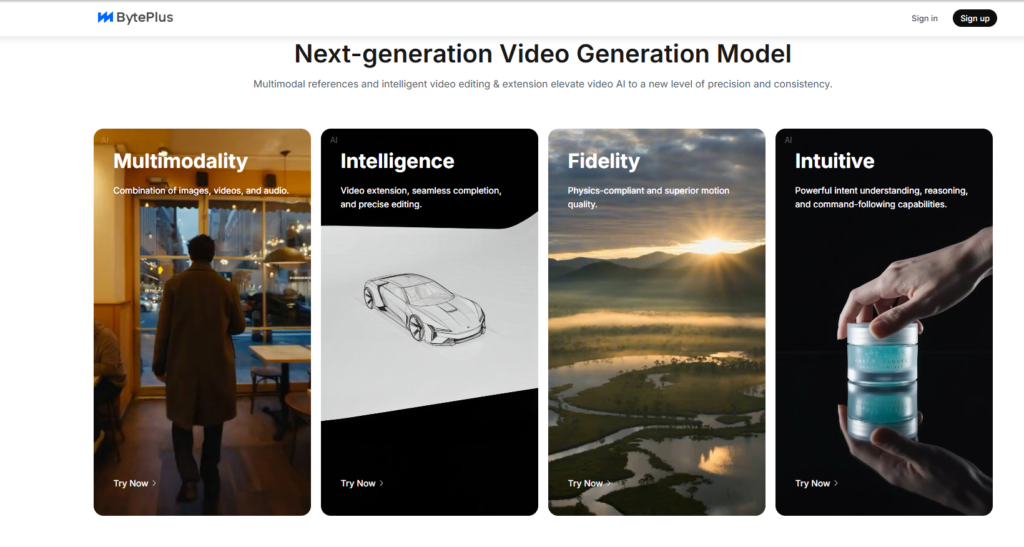
Seedance 2.0 is ByteDance’s flagship AI video generation model, released globally in 2026. It handles text-to-video, image-to-video, native audio generation, multi-shot storytelling, and cinematic-level lighting and fabric realism. For freelancers producing marketing videos, social content, or campaign-ready clips, it has become one of the most requested tools this year, competing directly with Google Veo 3 and Sora 2.
The catch is that pricing is wildly inconsistent depending on where you access it. Some platforms lock Seedance 2.0 behind $129 a month subscriptions. Others will literally give it to you for free every single day. Knowing the difference is where freelancers save real money.
The Best Free Way to Use Seedance 2.0: Dreamina
If your goal is to try Seedance 2.0 without paying a cent, the smartest move is to go directly to the ByteDance ecosystem, because Seedance is their own model. Dreamina, at dreamina.capcut.com, is the official CapCut-connected platform. You sign in with any Google account and claim roughly 260 free login credits every single day. That’s enough for several short Seedance clips without ever pulling out a credit card.
Dreamina also offers a 7-day trial for around 1 RMB, which is about 14 cents, giving you extended access at essentially no cost. For a freelancer testing AI video for the first time, this is where I would start, full stop. It’s the same underlying model you’ll pay premium prices for elsewhere, accessed through the company that built it.
Other ByteDance platforms also offer free access. Doubao gives around 10 free Seedance generations per day, and Xiaoyunque provides roughly 120 free daily credits. For freelancers willing to stack accounts across platforms, these free allowances can easily cover a small client project without any subscription cost at all.
The Cheapest Paid Ways to Use Seedance 2.0
Once you outgrow the free tier, the paid landscape splits into two categories: pay-as-you-go APIs and monthly subscriptions. For freelancers, the right choice depends on your volume.
Runware stands out as the cheapest per-video option I could find, at roughly 7 cents for a 10-second Seedance Pro Fast clip. For freelancers doing occasional video work, this is genuinely the most cost-efficient route. You only pay for what you generate and there’s no recurring commitment.
Fal.ai is the go-to API option, charging around 30 cents per second of 720p video for standard Seedance 2.0, and about 24 cents per second for the Fast variant. It’s aimed at developers and power users, but if you’re comfortable with API calls, it’s one of the best rates available for serious volume.
For subscription lovers, Runway offers Seedance 2.0 access starting around $12 a month on their entry-level plan, making it the cheapest subscription route. Higgsfield, by contrast, charges $49 a month for their Plus plan but only gives you roughly 11 Seedance 2.0 Fast videos per month within that credit allowance. For pure Seedance access, Higgsfield is not the best value, and their $129 Ultra plan only makes sense if you need the wider model library.
Seedance 2.0 Pricing Comparison at a Glance
Here’s how the main options stack up side by side so you can see the value gap quickly.
| Platform | ||
My Recommendation: Where to Start
If you’ve never used Seedance 2.0 before, go to Dreamina first. Sign in with your Google account, grab your free daily credits, and run a few test generations before you spend a single dollar. You’ll know within one session whether Seedance fits the kind of video work you’re doing for clients.
If you’re doing occasional client video work and want to keep costs minimal, Runware at 7 cents a clip is the most honest pay-as-you-go option out there. You’re not locked in, you’re not paying for credits you won’t use, and you’re getting the actual Seedance model at a price that makes sense for freelance work.
If you need a subscription and want the lowest monthly commitment, Runway at $12 a month is the cheapest door in. Higgsfield is a solid platform for access to a wide range of AI video models, but if Seedance is your primary reason for subscribing, you’ll get more value elsewhere.
Frequently Asked Questions
Is Seedance 2.0 free to use?
Yes, through several ByteDance platforms. Dreamina offers roughly 260 free login credits daily, Doubao gives around 10 free generations per day, and Xiaoyunque provides about 120 daily credits. These are real free tiers, not just trial limits.
Does Higgsfield Plus include Seedance 2.0?
Yes, but in a limited way. The $49 Plus plan gives access to Seedance 2.0 Fast, but only within the 1,000 monthly credit allowance, which works out to roughly 11 videos. It is not free or unlimited. Seedance 2.0 standard is not available on Plus at all — it requires Ultra or higher.
What is the cheapest way to get unlimited Seedance 2.0?
TopView AI’s business plan at $480 per year offers unlimited Seedance 2.0 access. Higgsfield’s Ultra plan offers 7-day unlimited Seedance access with a current 30% off promo. For true unlimited without a steep bill, stacking the free daily credits across Dreamina, Doubao, and Xiaoyunque remains the most budget-friendly approach for most freelancers.
Final Thoughts
Seedance 2.0 is genuinely impressive, and the good news for freelancers is that you don’t need to pay premium prices to access it. Dreamina gives you meaningful free daily use, Runware keeps costs honest for client work, and Runway offers the lowest subscription entry point if you want something more structured. Skip Higgsfield for Seedance specifically unless you want the wider model range that plan comes with.
OTHER 10000+ FREE TOOLS FOR YOUR WORK…..
Have you tried Seedance 2.0 on any of these platforms? Drop your experience in the comments below — I’d genuinely like to know what you found.