
GlobalGPT Review 2026: The Honest Guide for Freelancers
Quick Verdict
GlobalGPT sits in a genuinely unusual position among AI tools for freelancers. It is not a single AI assistant. It is not trying to compete with ChatGPT on a one-to-one basis. What GlobalGPT offers is access to more than 100 AI models from OpenAI, Google, Anthropic, xAI, and others, all under a single subscription. That proposition sounds almost too good to be true, which is why this review exists.
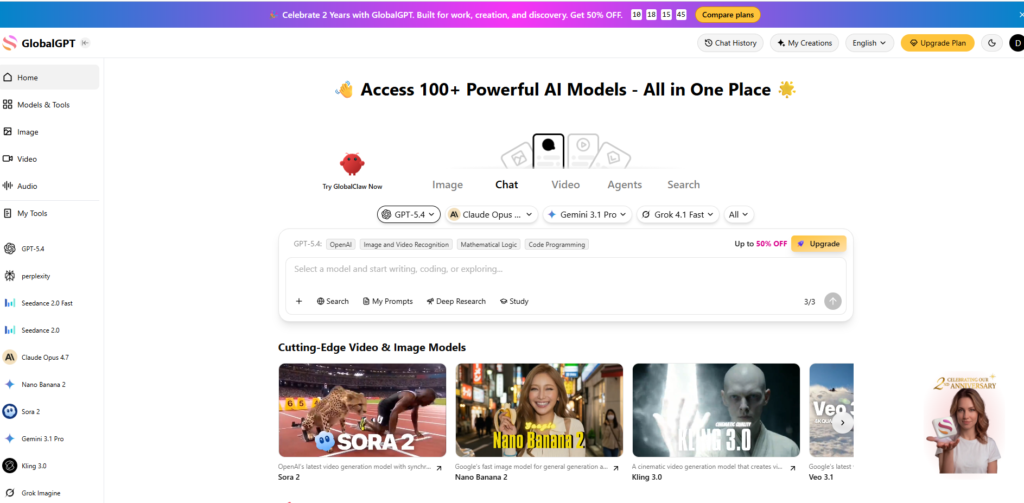
If you have been paying for ChatGPT Plus, Claude Pro, and Gemini Advanced separately, GlobalGPT’s pricing model could change your workflow and your costs significantly. If you are just looking for a solid AI writing tool to help with client work, the breadth of choice can also feel overwhelming. This GlobalGPT review cuts through both extremes and tells you what it is actually like to use day to day as a working freelancer.
We tested GlobalGPT across real freelance use cases including content drafting, research, image generation, client communication, and video creation. Here is the full picture.
Our Overall Rating: 4.2 out of 5
| Category | Score |
|---|---|
| Ease of Use | 4.0/5 |
| AI Model Variety | 5.0/5 |
| Writing Quality | 4.5/5 |
| Image Generation | 4.3/5 |
| Speed | 4.0/5 |
| Value for Money | 4.8/5 |
| AI Agents | 4.0/5 |
| Overall | 4.2/5 |
My First Week with GlobalGPT: What Actually Happened
I signed up expecting chaos. More than 100 AI models, a sidebar full of options, and a pricing page that shows you how much you would be spending if you bought each subscription individually. It was a lot to take in. Within twenty minutes, though, the interface made more sense. The homepage is essentially a multi-model chat hub. You pick your model from a dropdown, type your prompt, and get a response. Switching from GPT-5.4 to Claude Opus 4.7 to Gemini 3.1 Pro takes about three seconds and costs you no extra money beyond your plan credits.
The first thing I used it for was a content brief I needed to research and draft quickly. I ran the research query through Perplexity — accessible directly in the sidebar — to get sourced information, then switched to Claude Opus 4.7 to write a thoughtful first draft, then ran the draft through the AI Detector to check for AI fingerprinting before sending it to the client. All three steps happened inside one platform. That single workflow alone showed me what GlobalGPT is actually for: removing the tab-switching tax that freelancers who use multiple AI tools pay every day.
The challenges came when I explored the image and video generation side. The quality from models like Nano Banana Pro and GPT Image 1.5 is genuinely impressive, but understanding which model is best for which output type takes time to learn. The credit system also requires attention. Not all models cost the same number of credits, and burning through your monthly allowance on video generation without realising it is easy if you do not check the credit cost before running a job.
How to Get Started with GlobalGPT
Getting started is straightforward. Here is the full process from scratch.
Step 1: Create a GlobalGPT account
Go to glbgpt.com and click to sign up. You can create an account with an email address or through Google sign-in. The free tier gives you a limited number of credits to explore the platform before committing to a paid plan. This is genuinely useful for testing which models and features matter most to your specific workflow before spending anything.
Step 2: Explore the model library
Before you dive into a paid plan, spend time in the Models and Tools section. This is where GlobalGPT lists all available models with descriptions of what each one is optimised for. You will find models tagged by capability: long text processing, fast response, mathematical logic, code programming, web search, image generation, video generation, and more. Understanding what is available before you subscribe helps you choose the right plan tier for the types of work you do most.
Step 3: Choose your plan and subscribe
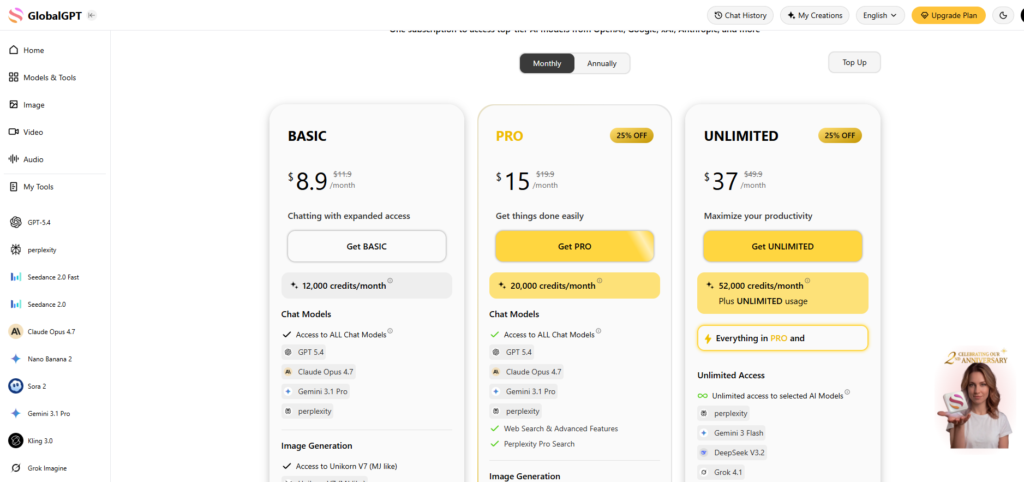
GlobalGPT offers three paid tiers: Basic, Pro, and Unlimited. The Basic plan at $8.90 per month gives you 12,000 credits per month and access to all chat models including GPT-5.2, Claude Opus 4.7, Gemini 3 Pro, and Perplexity. The Pro plan at $15 per month gives 20,000 credits per month and adds web search, Perplexity Pro Search, full image generation access, and full AI Agent access. The Unlimited plan at $37 per month gives 52,000 credits plus unlimited access to selected models and all video tools. Annual billing brings these to $5.80, $10.80, and $25 per month respectively.
Step 4: Set up your first multi-model workflow
The real power of GlobalGPT comes from combining models in a single session. A practical starting workflow for content freelancers: use Perplexity for sourced research on your topic, switch to Claude Opus or GPT-5.4 for drafting, use the AI Detector to check the output before client delivery. You can run all three steps without leaving the platform. Build this as a repeatable process and you will save meaningful time on every content piece you produce.
Step 5: Set up AI Agents for recurring tasks
On the Pro plan and above, you get access to GlobalGPT’s AI Agents. Start with ChatPDF if you regularly process research papers, client documents, or lengthy briefs. Set up Deep Research for client work that requires structured investigation across multiple sources. GlobalClaw, GlobalGPT’s newest agent, runs locally on your device and handles voice interactions, browser automation, and multi-agent workflows. These tools are not fully polished yet but they represent the most forward-looking part of the platform for freelancers who want to move beyond basic chatting.
GlobalGPT: What It Actually Does for Freelancers
GlobalGPT is not a single AI tool. It is an aggregation platform that gives you access to the best AI models from multiple providers under one subscription. That distinction shapes everything about how it is useful and where its limits lie.
Multi-Model Chat Access
The core proposition is simple: pay one subscription and switch between GPT-5.4, Claude Opus 4.7, Gemini 3.1 Pro, Grok 4.1, DeepSeek V3.2, and many others as freely as you switch browser tabs. For freelancers who have learned that different AI models have different strengths, this is enormously practical. Claude tends to produce more thoughtful, nuanced prose. GPT excels at structured output and code. Gemini handles long documents and multimodal tasks well. Being able to pick the right model for each task rather than forcing everything through a single assistant lifts the quality of your output across the board.
AI Image Generation
GlobalGPT gives access to a wide range of image generation models depending on your plan. The Pro plan includes Nano Banana Pro, GPT Image 1.5, Seedream 4.5, FLUX.2 Pro, Ideogram, and a full image editor. For freelancers who create social media content, blog visuals, or client presentations, having this range in a single platform removes the need for a separate Midjourney or Adobe Firefly subscription for most standard creative work. The image editor built into the platform adds basic retouching and variation capabilities without requiring a separate design tool.
AI Video and Audio Generation
The Unlimited plan adds access to video generation models including Sora 2, Kling, Seedance, Runway, Luma, and Veo. For freelancers producing short-form video content, social clips, or explainer videos for clients, having these tools accessible without individual subscriptions to Runway, Kling, and Sora represents significant savings. The audio side includes Eleven Lab v3 for voiceover and text-to-speech work. This is where GlobalGPT becomes particularly interesting for multimedia freelancers who have previously juggled four or five separate creative AI subscriptions.
AI Agents
The Agents section is GlobalGPT’s most ambitious area. ChatPDF lets you have a conversation with any PDF document, which is useful for quickly extracting information from long research documents, contracts, or client briefs. Deep Research runs an AI-driven multi-step research process that surfaces and organises information from across the web into a structured report. The AI Detector analyses text and identifies AI-generated content with reasonable accuracy, which matters for freelancers who need to ensure their output passes editorial review. GlobalClaw is the newest and most experimental agent: a local AI assistant that runs on your own device and can interact with your browser, handle voice input, and coordinate multi-agent tasks.
Web Search with AI
All paid plans include AI Web Search, which routes queries through live web access before generating responses. This addresses the biggest practical weakness of standard language models: outdated information. For freelancers researching current trends, recent statistics, or live pricing data for client work, having web-connected AI responses removes the fact-checking step that otherwise follows every AI output. The Perplexity integration on the Pro plan adds citation-backed research responses that give you sourced answers you can reference or verify directly.
GlobalGPT Pricing
GlobalGPT uses a credit-based system on top of its plan tiers. Here is what you are looking at across the options.
| Plan | Monthly Price | Annual Price | Credits/Month | Key Features |
|---|---|---|---|---|
| Basic | $8.90/mo | $5.80/mo | 12,000 | All chat models, basic image generation |
| Pro | $15/mo | $10.80/mo | 20,000 | Everything in Basic plus web search, all image models, AI Agents |
| Unlimited | $37/mo | $25/mo | 52,000 + unlimited selected | Everything in Pro plus all video models, unlimited key models |
| Team / Enterprise | Custom | Custom | Custom | Contact GlobalGPT directly |
The value case for GlobalGPT becomes clear when you compare its Pro plan to buying each included subscription individually. A solo freelancer who currently pays for ChatGPT Plus at $20, Claude Pro at $20, and Gemini Advanced at $20 is already at $60 per month for just three models. GlobalGPT’s Pro plan at $15 per month, or $10.80 on annual billing, covers all three of those models plus Perplexity, full image generation, and AI Agents on top. For freelancers who already use multiple AI subscriptions, the cost argument is genuinely compelling.
Challenges Freelancers Face with GlobalGPT
Challenge 1: The credit system requires active management
What happens: you start your month with 20,000 credits on the Pro plan, run a few image generation jobs and a video test, and find yourself credit-limited before the end of the month. Why it happens: different models consume credits at very different rates. A standard chat message costs far fewer credits than an image generation or a video clip. The fix: check the credit cost of any image or video generation task before running it. Keep a rough tally of where you are mid-month if you do intensive creative work. GlobalGPT also offers top-up credit packs if you hit your limit before month end.
Challenge 2: Model choice paralysis for new users
What happens: you open a new chat, see a dropdown with more than a dozen models, and spend five minutes trying to decide which one to use for a blog introduction. Why it happens: GlobalGPT’s strength is its breadth, but breadth creates decision friction for freelancers who just want to get started quickly. The fix: spend your first week sticking to just two models: Claude Opus 4.7 for nuanced writing and GPT-5.4 for structured output. Build familiarity with those two before branching out. Within a month you will have a clear model preference for each type of task you do regularly.
Challenge 3: AI Agents are powerful but not plug-and-play
What happens: you see GlobalClaw described as a personal AI assistant and expect to set it up in five minutes. The reality involves a local installation process and some configuration before it works reliably.
Why it happens: GlobalClaw is a genuinely ambitious local-first AI agent, and local AI tools inherently require more setup than cloud-based features.
The fix: treat GlobalClaw as a feature to explore after you are comfortable with the rest of the platform. Start with ChatPDF and Deep Research, which work entirely in the browser with no setup required.
Challenge 4: No native workspace integration
What happens: you finish drafting something in GlobalGPT and then have to copy-paste it into your project management tool, your Google Docs client folder, or your CMS. There is no native integration with Notion, Trello, Asana, or similar tools.
Why it happens: GlobalGPT is built as an AI model hub, not a productivity workspace.
The fix: use GlobalGPT for generation and processing, then use your existing workflow tools for storage and management. The copy-paste step is a minor friction cost that the quality and cost savings offset easily for most freelancers.
GlobalGPT Pros and Cons
Pros
- Access to 100+ AI models from OpenAI, Anthropic, Google, xAI, and others under one subscription
- Significantly cheaper than paying for multiple individual AI subscriptions separately
- Web search included on all paid plans, giving real-time information access
- Strong image generation suite including GPT Image 1.5, FLUX.2 Pro, and Ideogram on Pro
- AI Agents including Deep Research, ChatPDF, and AI Detector add genuine utility for freelance work
- Clean interface that makes model switching fast and low-friction
- Covers chat, image, video, and audio generation in a single platform
- Generous annual billing discounts reduce the effective monthly cost significantly
Cons
- Credit system requires active monitoring to avoid mid-month shortfalls on image and video tasks
- Model choice breadth creates friction for new users who just want a quick answer
- No native integration with workspace tools like Notion, Trello, or Google Docs
- GlobalClaw agent requires local installation and technical setup before it works
- Video generation models are locked behind the most expensive Unlimited plan
- Output quality is only as good as the model you choose and the prompt you write
GlobalGPT vs Individual AI Subscriptions
The comparison most relevant to freelancers is not GlobalGPT versus a single AI tool. It is GlobalGPT versus the collection of AI tools you are already paying for separately. Here is how GlobalGPT’s Pro plan stacks up against a typical multi-tool freelance stack.
| Tool | Standalone Cost | In GlobalGPT Pro |
|---|---|---|
| ChatGPT Plus (GPT-5) | $20/mo | Included |
| Claude Pro (Opus 4.7) | $20/mo | Included |
| Gemini Advanced | $20/mo | Included |
| Perplexity Pro | $20/mo | Included |
| Midjourney (image gen) | $10/mo | Comparable models included |
| Total standalone | $90/mo | $15/mo (Pro) or $10.80/mo annual |
The honest caveat: GlobalGPT’s access to each model is credit-gated, which means heavy users of any single model may find the credit limits restrictive compared to an unlimited direct subscription. If you run ChatGPT for eight hours a day on complex tasks, a direct ChatGPT Plus subscription may still be worth keeping alongside GlobalGPT. But for the majority of freelancers who use AI tools in bursts across a working day rather than at continuous high volume, GlobalGPT’s credit allowances are more than adequate.
Who Should Use GlobalGPT
GlobalGPT is the right fit for freelancers who already pay for two or more separate AI subscriptions and want to consolidate them without sacrificing access to their preferred models. The cost savings alone justify the switch for anyone spending $40 or more per month across individual AI tools. It is also a strong option for freelancers who produce diverse types of content, because the ability to use the best text model, the best image model, and a research tool in the same session without switching platforms genuinely improves the quality and speed of creative work.
Freelancers who are new to AI tools and want to explore what different models can do will also find GlobalGPT a cost-effective starting point. Rather than committing to a single platform and finding out later that a different model suits your work better, GlobalGPT lets you test them all within a single affordable subscription.
Who Should Not Use GlobalGPT
If you are a heavy user of a single AI tool and use it continuously throughout your working day, the credit system may constrain you in ways that a direct unlimited subscription would not. Power users of Claude or ChatGPT who run long, complex sessions daily should run the maths on whether the credit limits match their actual usage before switching entirely.
Freelancers who want their AI tool to integrate natively with their project management or content workflows will also find GlobalGPT incomplete. There is no Notion integration, no direct CMS publishing, and no automation layer connecting GlobalGPT to the rest of your tool stack. If workflow integration is a priority, a more purpose-built writing tool with API connections may serve you better alongside a core AI subscription.
What’s New in GlobalGPT for 2026
GlobalGPT has been on an aggressive update cycle heading into 2026, consistent with the platform’s second-anniversary milestone. The most significant additions are the newest frontier models including GPT-5.4, Claude Opus 4.7, Gemini 3.1 Pro, and Grok 4.1 Fast, all available to subscribers without additional fees. The video generation suite has expanded substantially with Sora 2, Kling O1, Seedance 2.0 Fast, and Google Veo 3.1 all added to the Unlimited plan.
GlobalClaw is the platform’s most ambitious 2026 addition. This local-first AI agent brings voice interaction, browser automation, and multi-agent task coordination to GlobalGPT users who want to move beyond manual prompting. It is the clearest signal of where GlobalGPT is heading: from a model aggregator towards a full AI operating environment for knowledge workers. The MiniMax M2.7 model, described as designed for autonomous real-world productivity, points in the same direction.
Final Verdict
The GlobalGPT review verdict is straightforward for freelancers who already use multiple AI tools: this is the most cost-effective way to consolidate your AI stack without giving up access to the models you rely on. The Pro plan at $15 per month, or $10.80 on annual billing, covers more capable AI models than most freelancers will ever need, adds web search and image generation, and throws in AI Agents that solve real workflow problems. If you are currently paying $40 to $90 per month across separate AI subscriptions, switching to GlobalGPT is worth testing immediately.
For freelancers building a broader AI writing stack, our Writesonic Review and Jasper AI Review cover tools built specifically around content generation and SEO writing at scale.
Frequently Asked Questions
Is GlobalGPT worth it for freelancers?
Yes, particularly if you already pay for more than one AI subscription. The Pro plan at $15 per month gives you access to GPT-5, Claude Opus 4.7, Gemini, Perplexity, and a full image generation suite, which would collectively cost $90 or more per month if subscribed to individually. For freelancers who use AI tools regularly but not at extreme volume, the credit allowances on the Pro plan are more than sufficient.
Can GlobalGPT replace ChatGPT for freelancers?
In most freelance use cases, yes. GlobalGPT gives you access to the same GPT models including GPT-5.4 as a direct ChatGPT Plus subscription, alongside Claude, Gemini, Grok, and many others, all at a lower monthly cost. The difference is the credit system: if you run extremely high-volume GPT sessions daily, a direct ChatGPT Plus subscription offers more flexible unlimited usage. For typical freelance workflows, GlobalGPT covers everything ChatGPT does and more.
Does GlobalGPT have access to the internet?
Yes. All GlobalGPT paid plans include AI Web Search, giving responses access to live web data rather than relying solely on training data. The Pro plan additionally includes Perplexity Pro Search for citation-backed, sourced research responses. This is a significant practical advantage over tools that operate from training data alone, particularly for freelancers researching current topics, prices, or statistics for client work.
What is the difference between GlobalGPT Basic and Pro?
The Basic plan gives you all chat models and basic image generation at $8.90 per month. The Pro plan at $15 per month adds web search, Perplexity Pro Search, all advanced image generation models including GPT Image 1.5 and FLUX.2 Pro, the full image editor, and complete access to AI Agents including ChatPDF, Deep Research, AI Detector, and GlobalClaw. For most freelancers who want the full capability set, the Pro plan is the practical starting point.
Is there a free version of GlobalGPT?
GlobalGPT offers a free tier with limited credits that lets you test the platform and explore the model library before committing to a paid plan. The free tier is sufficient to form a clear view of whether the platform suits your workflow. Paid plans start at $8.90 per month on monthly billing or $5.80 per month on annual billing, making GlobalGPT one of the more accessible entry points for a multi-model AI platform.