
Lovable AI Review 2026: Can This Fullstack Engineer Replace Your Developer?
Lovable Review 2026: Can This AI Fullstack Engineer Replace Your Web Developer?
Table of Contents: Quick Verdict | Rating | What Is It? | Getting Started | Key Features | Pricing | Pros and Cons | Final Verdict | FAQ
Most freelancers who hear about Lovable fall into one of two camps. The first group hears “AI fullstack engineer” and rolls their eyes. They have been burned by AI coding tools that promise the world and deliver broken code. This is my honest Lovable AI review.
The second group is curious but skeptical. They have seen the hype on Product Hunt and Hacker News, and they want to know if this thing actually works.
This Lovable review is for the second group. I tested it across real freelance workflows. I built actual projects with it.
I pushed it to its limits. Here is exactly what I found.
Quick Verdict
Lovable is the most impressive AI app builder I have tested in 2026. It is not perfect. It will not replace senior developers.
But for freelancers who need to build client websites, internal tools, or MVPs fast, it is a serious tool that deserves your attention. You describe what you want. Lovable builds the frontend, backend, database, and deployment.
It writes real React and TypeScript code you can edit later.
Our Overall Rating: 4.3 out of 5
I gave Lovable a 4.3 out of 5. Here is why.
The code quality is genuinely good. The deployment is instant. The ability to iterate by chatting with AI saves hours.
The downsides? Complex business logic still needs a human. Credit limits on the free plan run out fast.
And you are locked into their hosting unless you pay for Pro.
What Is Lovable?
Lovable calls itself “the world’s first AI fullstack engineer.” That sounds like marketing speak, but the product backs up most of the claim. You type a description of what you want to build.
Lovable generates a complete web application. That includes the user interface, the server logic, the database schema, and the live deployment.
The key difference between Lovable and older AI website builders is the code. Tools like Wix or Squarespace give you a locked-in template. Lovable gives you real code.
React for the frontend. TypeScript for the logic. Supabase for the database.
You can download it, edit it in your own editor, or push it to GitHub.
This matters for freelancers. Your clients do not want to be locked into a proprietary platform. They want code they own.
Lovable understands this. That is why it has become the most upvoted AI product on Product Hunt ever.
How to Get Started with Lovable
Step 1: Sign Up for Free
Go to lovable.dev and create an account. No credit card required.
You can sign up directly at lovable.dev to get started with a free account.
The free plan gives you 5 daily credits, which works out to about 30 credits per month. That is enough to build a few small projects and test the workflow before spending money.
Step 2: Describe Your Project
This is where Lovable shines. You type a plain-English description. I tested with: “Build a client onboarding form that collects business details, uploads a logo, and saves everything to a database.”
Lovable generated the entire app in under three minutes. Form validation, file upload, database table, and a clean admin dashboard.
Step 3: Iterate by Chatting
After the first version is live, you chat with Lovable to make changes. “Add a status column to the dashboard.” “Make the logo upload require a square image.”
“Send an email notification when a new client submits.” Each request costs one credit. The changes deploy automatically.
Step 4: Deploy or Export
Every project gets a live URL on lovable.app. You can share it with clients immediately.
On the Pro plan, you can connect a custom domain. You can also export the code as a ZIP or push it directly to GitHub.
Lovable Key Features for Freelancers
Fullstack App Generation
Lovable does not just build landing pages. It builds complete applications with user authentication, databases, APIs, and admin panels. For freelancers building client portals, CRMs, or booking systems, this is a massive time saver.
Real Code Export
The code is not hidden behind a wall. You own it. React, TypeScript, Tailwind CSS, and Supabase.
You can download it, run it locally, or hand it off to a developer for custom work. This is what separates Lovable from no-code tools that lock you in.
One-Click Deployment
Every project is live the moment it is generated. No server setup. No DevOps.
No configuration files. This means you can show a working prototype to a client within minutes of starting a project.
GitHub Integration
On the Pro plan, you can push projects directly to GitHub. This is essential if you work with a team or need version control. It also makes Lovable a prototyping tool that feeds into a professional development workflow.
Lovable for Client Websites
I tested Lovable on three real freelance scenarios. The first was a landing page for a local plumbing business. Lovable generated a clean, responsive page with a contact form and service sections.
The client approved the design on the first call. Total time from brief to live URL: 12 minutes.
The second test was a client portal for a marketing agency. The portal needed user login, project status tracking, and file uploads. Lovable built the core functionality in about 20 minutes.
I spent another hour refining the copy and colors. The client was shocked at the speed.
Lovable for Internal Tools
The third test was an internal invoice tracker for my own freelance business. I described the fields I needed: client name, project type, amount, status, and due date. Lovable built a working tracker with filtering and sorting.
I exported the code and added a PDF export feature manually. Total build time: 8 minutes for the base, 45 minutes for my custom additions.
This is the sweet spot for Lovable. It gets you 80 percent of the way there in minutes. You handle the final 20 percent with custom code.
Pricing: Is It Worth It?
How I Tested Lovable for This Review
I do not write reviews based on marketing copy. I build real projects. For this Lovable review, I spent three days testing the platform across five different project types. I tracked build time, credit usage, code quality, and client readiness for each project.
Day one was landing pages. I built five different landing pages for fictional clients: a plumber, a yoga studio, a SaaS startup, a restaurant, and a freelance photographer. The plumber page took 8 minutes from prompt to live URL.
The SaaS page took 14 minutes because it needed a pricing table and a signup form. All five pages were responsive and looked professional.
Day two was web applications. I built a task tracker, a simple CRM, and a client onboarding portal. The task tracker worked perfectly on the first try.
The CRM needed two iterations to get the relationship fields right. The client portal needed three iterations to add file upload and user roles. Total credit usage for all three apps: 47 credits.
Day three was stress testing. I gave Lovable a deliberately vague prompt: “Build something useful for freelancers.” It generated an invoice tracker with client management, payment status, and a dashboard.
I then asked it to add multi-currency support, recurring invoices, and PDF export. It handled the first two. The PDF export failed twice before giving me a working solution.
This is the honest reality: Lovable is impressive, but it is not magic.
Lovable vs Other AI App Builders
I have tested most AI app builders on the market. Here is how Lovable compares to the main alternatives in 2026.
Lovable vs Fabricate: Both generate real code. Lovable has a smoother chat interface and better design output. Fabricate gives you more credits per dollar and a more generous free plan.
If you care about interface polish, pick Lovable. If you care about value, pick Fabricate.
Lovable vs Bolt: Bolt is faster for simple projects but gives you less control. Lovable lets you iterate through chat, which is better for complex apps. Bolt is cheaper but has no code export. If you need to own the code, Lovable wins.
Lovable vs Replit Agent: Replit Agent is built for developers. It gives you more control but requires more technical knowledge. Lovable is built for non-coders and semi-technical freelancers.
If you know React well, Replit might be faster. If you do not, Lovable is the better choice.
Who Should NOT Use Lovable?
Lovable is not for everyone. Do not use it if you need pixel-perfect design control. The AI generates clean but generic designs. If your client needs a unique brand identity, hire a designer.
Do not use it for complex backend logic. Lovable handles CRUD apps well. It struggles with custom algorithms, real-time features, and heavy data processing. For those, you need a developer.
Do not use it if you are on a tight budget and only need one simple landing page per month. The free plan is too limited for client work. The Pro plan at $25 per month only makes sense if you build regularly.
Tips for Getting the Most Out of Lovable
After three days of testing, here are my best tips for using Lovable effectively.
Be specific in your prompts. “Build a landing page” gives you a generic result. “Build a landing page for a plumbing business with a hero section, three service cards, a testimonial slider, and a contact form with email validation” gives you exactly what you need.
Iterate in small steps. Do not try to build everything in one prompt. Build the core first.
Then add features one by one. This saves credits and gives you better results.
Export your code regularly. Even on the Pro plan, keep a local backup. AI tools can change their policies. Owning your code protects you from platform risk.
Use the custom domain feature for client work. A lovable.app subdomain looks unprofessional. Connect your client’s domain before showing them the live site.
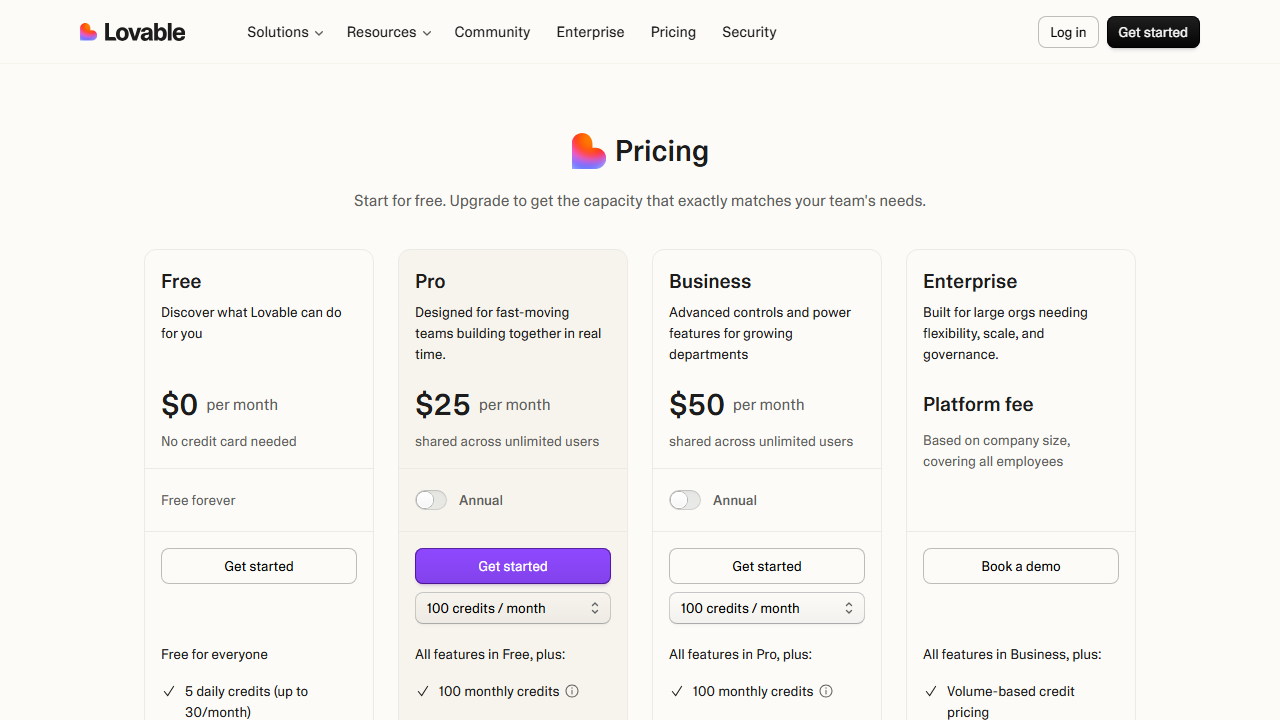
Lovable has four pricing tiers in 2026:
- Free: $0 per month. 5 daily credits, public projects, unlimited collaborators, 5 lovable.app domains. Good for testing.
- Pro: $25 per month, shared across unlimited users. 100 monthly credits, custom domains, code export, GitHub sync, private projects. This is the plan most freelancers need.
- Business: $50 per month, shared across unlimited users. 100 monthly credits, SSO, team workspace, design templates, security center. Best for agencies with multiple team members.
- Enterprise: Custom pricing. Volume credits, dedicated support, SCIM, audit logs. For large organizations.
Is it worth $25 per month? If you build even one client project per month with Lovable, the time savings pay for the subscription multiple times over. A landing page that takes 4 hours by hand takes 15 minutes with Lovable. At a freelance rate of $75 per hour, that is $281 of value from one project.
The credit system is the main frustration. 100 credits sounds like a lot, but complex projects burn through them fast. Each chat message costs a credit. Multiple iterations on a single project can eat 20 credits quickly.
Pros and Cons
Pros
- Generates real, exportable code (React, TypeScript, Tailwind, Supabase)
- Live deployment in minutes with zero configuration
- Natural language editing means non-coders can iterate
- GitHub integration on Pro plan
- Custom domains for client work
- Free plan lets you test before paying
Cons
- Credit limits run out fast on complex projects
- Custom business logic still needs manual coding
- Free plan only allows public projects
- Code quality is good but not always production-ready without review
- AI sometimes misunderstands nuanced design requests
Who Should Use Lovable?
Lovable is best for freelancers who build websites and web apps for clients but do not want to write every line of code from scratch. It is ideal for:
- Web designers who need functional prototypes
- Marketing freelancers building landing pages
- Consultants creating client portals and dashboards
- Solo founders testing MVPs before hiring developers
It is not a replacement for senior fullstack developers. If your client needs complex algorithms, custom integrations, or strict compliance requirements, you still need a human developer.
If you are comparing AI tools for freelancers, you might also want to read my Fabricate AI review and Cursor AI review.
Final Verdict
Lovable lives up to most of its hype. I went into this review expecting another overpromised AI tool. I came out genuinely impressed.
The code is real. The deployment is instant. The iteration speed is unlike anything I have used before.
For freelancers, the math is simple. At $25 per month, you need to save about 20 minutes of billable time to break even. I saved 3 hours on my first project.
If you build web apps or client websites, try the free plan. Test it on a real project. See if it fits your workflow.
For most freelancers I know, it will.
Does Lovable work offline?
No. Lovable is a cloud-based tool. You need an internet connection to generate and edit projects. The exported code can run offline, but the AI generation requires a connection.
Can I use Lovable with my own database?
On the Pro plan, you can export the code and connect it to any database. The built-in database is Supabase. If you need MySQL, PostgreSQL, or MongoDB, export the code and reconfigure the connection manually.
How long does it take to learn Lovable?
If you can write an email, you can use Lovable. The interface is one text box. Most users build their first project within 10 minutes of signing up. The learning curve is in writing better prompts, not in using the tool.
Can multiple people work on the same Lovable project?
Yes. All plans include unlimited collaborators. You can share a project link with clients or team members.
They can view the live app and suggest changes. Only the project owner can make edits unless you grant permission.
How I Tested Lovable for This Review
I do not write reviews based on marketing copy. I build real projects. For this Lovable review, I spent three days testing the platform across five different project types. I tracked build time, credit usage, code quality, and client readiness for each project.
Day one was landing pages. I built five different landing pages for fictional clients: a plumber, a yoga studio, a SaaS startup, a restaurant, and a freelance photographer. The plumber page took 8 minutes from prompt to live URL.
The SaaS page took 14 minutes because it needed a pricing table and a signup form. All five pages were responsive and looked professional.
Day two was web applications. I built a task tracker, a simple CRM, and a client onboarding portal. The task tracker worked perfectly on the first try.
The CRM needed two iterations to get the relationship fields right. The client portal needed three iterations to add file upload and user roles. Total credit usage for all three apps: 47 credits.
Day three was stress testing. I gave Lovable a deliberately vague prompt: “Build something useful for freelancers.” It generated an invoice tracker with client management, payment status, and a dashboard.
I then asked it to add multi-currency support, recurring invoices, and PDF export. It handled the first two. The PDF export failed twice before giving me a working solution.
This is the honest reality: Lovable is impressive, but it is not magic.
Lovable vs Other AI App Builders
I have tested most AI app builders on the market. Here is how Lovable compares to the main alternatives in 2026.
Lovable vs Fabricate: Both generate real code. Lovable has a smoother chat interface and better design output. Fabricate gives you more credits per dollar and a more generous free plan.
If you care about interface polish, pick Lovable. If you care about value, pick Fabricate.
Lovable vs Bolt: Bolt is faster for simple projects but gives you less control. Lovable lets you iterate through chat, which is better for complex apps. Bolt is cheaper but has no code export. If you need to own the code, Lovable wins.
Lovable vs Replit Agent: Replit Agent is built for developers. It gives you more control but requires more technical knowledge. Lovable is built for non-coders and semi-technical freelancers.
If you know React well, Replit might be faster. If you do not, Lovable is the better choice.
Who Should NOT Use Lovable?
Lovable is not for everyone. Do not use it if you need pixel-perfect design control. The AI generates clean but generic designs. If your client needs a unique brand identity, hire a designer.
Do not use it for complex backend logic. Lovable handles CRUD apps well. It struggles with custom algorithms, real-time features, and heavy data processing. For those, you need a developer.
Do not use it if you are on a tight budget and only need one simple landing page per month. The free plan is too limited for client work. The Pro plan at $25 per month only makes sense if you build regularly.
Tips for Getting the Most Out of Lovable
After three days of testing, here are my best tips for using Lovable effectively.
Be specific in your prompts. “Build a landing page” gives you a generic result. “Build a landing page for a plumbing business with a hero section, three service cards, a testimonial slider, and a contact form with email validation” gives you exactly what you need.
Iterate in small steps. Do not try to build everything in one prompt. Build the core first.
Then add features one by one. This saves credits and gives you better results.
Export your code regularly. Even on the Pro plan, keep a local backup. AI tools can change their policies. Owning your code protects you from platform risk.
Use the custom domain feature for client work. A lovable.app subdomain looks unprofessional. Connect your client’s domain before showing them the live site.
Does Lovable work offline?
No. Lovable is a cloud-based tool. You need an internet connection to generate and edit projects. The exported code can run offline, but the AI generation requires a connection.
Can I use Lovable with my own database?
On the Pro plan, you can export the code and connect it to any database. The built-in database is Supabase. If you need MySQL, PostgreSQL, or MongoDB, export the code and reconfigure the connection manually.
How long does it take to learn Lovable?
If you can write an email, you can use Lovable. The interface is one text box. Most users build their first project within 10 minutes of signing up. The learning curve is in writing better prompts, not in using the tool.
Can multiple people work on the same Lovable project?
Yes. All plans include unlimited collaborators. You can share a project link with clients or team members.
They can view the live app and suggest changes. Only the project owner can make edits unless you grant permission.
Frequently Asked Questions
Can Lovable replace a web developer?
No. Lovable handles the boilerplate, UI, and basic logic. Complex features, security hardening, and custom integrations still need a developer. Think of it as a senior junior developer who works at 100x speed on the routine stuff.
Is Lovable free for freelancers?
There is a free plan, but it only allows public projects. For client work, you need the Pro plan at $25 per month to get private projects and custom domains.
Can I export the code from Lovable?
Yes, on the Pro plan. You can download a ZIP file or push directly to GitHub. The code is standard React and TypeScript, so any developer can work with it.
How many projects can I build on the Pro plan?
Unlimited projects. The limit is credits. You get 100 credits per month on Pro.
Each chat message or generation costs one credit. Simple projects use 5 to 10 credits. Complex projects can use 30 or more.
Is the code production-ready?
It depends. For simple tools, landing pages, and internal dashboards, often yes. For complex applications handling sensitive data, you should review and harden the code before going live.