
n8n Review 2026: Is This Open-Source Automation Platform Worth It?
n8n Review 2026: Is This Open-Source Automation Platform Worth It?
This n8n review covers everything I learned after spending three weeks building workflows on both the cloud and self-hosted versions of the platform. I wanted to see whether this open-source automation tool could replace my existing stack of paid SaaS connectors. After running dozens of workflows, testing AI agent nodes, and pushing the visual builder to its limits, I have a clear picture of who should use n8n and where it falls short.
n8n has grown from a niche GitHub project into a serious alternative to Zapier and Make. The fair-code license, deep self-hosting support, and fast-expanding node library make it attractive to privacy-conscious teams and technical users. In this article, I break down pricing, features, AI capabilities, and real-world performance so you can decide if n8n fits your automation needs in 2026.
What Is n8n?
n8n is an open-source workflow automation platform that lets you connect APIs, databases, and services using a visual node-based builder. You drag nodes onto a canvas, link them with connections, and define logic without writing full applications. The name comes from “nodemation” with an eight-letter play, and the tool lives at n8n.io.
Unlike fully proprietary tools, n8n uses a fair-code license. This means the source code is publicly visible and you can self-host the product for free. The company behind n8n offers paid cloud plans and enterprise support, but the core software remains accessible to anyone who wants to run it on their own server.
I first heard about n8n from a developer friend who was tired of paying per-task fees on other platforms. He self-hosted it on a small VPS and ran thousands of operations per month for the cost of the server alone. That low barrier to entry convinced me to test it myself.
Getting Started with n8n
I started my n8n review by signing up for the cloud trial. The onboarding flow asked about my use case and dropped me straight into a template gallery. Within five minutes, I had a working webhook workflow that posted form data to a Slack channel. The interface felt clean and the node search was fast.
Next, I installed the self-hosted version using Docker Compose on a virtual private server. The official documentation was clear and the container started without errors. I mapped a persistent volume for the SQLite database, opened port 5678, and had a local instance running in under ten minutes.
The visual workflow builder uses a canvas where each node represents a step. You click to add a node, search by service name or function, and connect triggers to actions with simple drag gestures. I found the learning curve gentle for basic linear workflows, though branching logic took a little longer to master.
One thing I appreciated was the execution history panel. Every time a workflow runs, n8n logs the input and output data for each node. This makes debugging much faster than guessing why a step failed. I could click on a failed execution, inspect the JSON payload, and fix the issue without rerunning the entire flow.
Visual Workflow Builder
The heart of n8n is its visual workflow builder. I built flows ranging from simple two-step automations to complex trees with conditional branches, loops, and error handling paths. The canvas zooms smoothly and the grid layout keeps everything organized even when a workflow grows to twenty or more nodes.
Each node exposes configuration fields that map directly to the API parameters of the underlying service. When I added a Google Sheets node, I could select the spreadsheet, worksheet, and operation without leaving the builder. The mapping UI lets you reference output from previous nodes using a simple expression syntax.
Expressions in n8n use a JSON-based syntax wrapped in double curly braces. It looks technical at first, but the autocomplete dropdown shows available fields from earlier nodes. After writing a few expressions, I could map data fields without guessing variable names. The built-in expression editor also includes a live preview so you can test mappings before saving.
For advanced users, the Function node allows writing custom JavaScript or Python code. I used this to reshape API responses that did not match the schema expected by downstream nodes. The code runs in a sandboxed environment, so you get flexibility without compromising server security on self-hosted installs.
Integrations and the Node Library
n8n ships with over four hundred integrations covering CRMs, databases, messaging apps, file storage, and marketing tools. I connected to Notion, Airtable, Telegram, Postgres, and AWS S3 during my testing. Each node felt mature, with most supporting the full range of operations available in the service API.
When a native node does not exist, the HTTP Request node fills the gap. I used it to call a private internal API that had no official integration. You can set headers, authentication, query parameters, and body content graphically. I saved my common HTTP requests as reusable credentials, which kept my workflows tidy.
The community also builds custom nodes that you can install through the CLI. I added a third-party node for a lesser-known Portuguese invoicing API in under two minutes. The npm package installed globally, and the new node appeared in the builder search after a quick refresh. This extensibility is hard to match on closed platforms.
Webhook triggers are another strong point. I created HTTPS endpoints that accepted POST requests from external services. n8n automatically generated the URL and handled the response. I used webhook triggers to build a contact form backend, a GitHub issue listener, and a Stripe payment notification handler.
AI and LangChain Integration
In 2026, n8n has become one of the best automation platforms for AI agent workflows. The platform now includes more than seventy AI nodes that connect to large language models, vector databases, and embedding services. I tested OpenAI GPT-4o, Anthropic Claude, and local Ollama models through the same unified interface.
The LangChain integration is where n8n really shines for technical users. You can build agent chains that retrieve documents from a vector store, pass context to a language model, and route outputs based on content. I built a support ticket classifier that read incoming emails, checked a Pinecone knowledge base, and drafted responses using Claude.
Each AI node exposes temperature, max tokens, and system prompt fields. I liked being able to tune these per step rather than relying on global defaults. The Expression Chat Model node lets you switch models dynamically based on workflow variables, which is useful when you want to use cheaper models for simple tasks and premium models for complex reasoning.
Vector store nodes for Pinecone, Qdrant, Weaviate, and Supabase pgvector are included. I created a Retrieval-Augmented Generation workflow that ingested PDFs, chunked them, stored embeddings, and answered questions based on the retrieved context. The whole pipeline ran inside n8n without external orchestration tools.
For developers building multi-agent systems, the Agent node supports ReAct, Plan and Execute, and Conversational Agent patterns. I found the ReAct agent most reliable for tool-calling tasks. You define a set of tools the agent can invoke, and the LLM decides which tool to use based on the user prompt and intermediate observations.
Data Transformation and Error Handling
Real workflows rarely run perfectly on the first try. n8n gives you solid tools for reshaping data and handling failures gracefully. The Set node lets you define new fields, rename keys, or filter arrays using a visual table interface. I used it to normalize data from three different CRMs into a single format before sending it to my reporting database.
Error handling is built into the connection logic. You can draw a second output line from any node to define what happens when that step fails. I routed failed API calls to a Slack notification and a retry loop. This meant my main workflow continued while I got alerted about issues in real time.
The If and Switch nodes let you branch workflows based on conditions. I created a branch that checked whether an email address was valid before adding it to my mailing list. Invalid addresses were logged to a separate table for manual review. This kind of defensive logic is essential for production automations.
For batch operations, the Split in Batches node processes items in chunks. I used this to avoid rate limits when updating five hundred rows in Airtable. By setting the batch size to fifty and adding a wait node between chunks, I stayed within the API quota without writing custom throttling code.
Self-Hosting and Privacy
One of the biggest reasons to choose n8n over competitors is self-hosting. When you run n8n on your own infrastructure, your data never leaves your server. I tested this on a VPS with two CPU cores and four gigabytes of RAM, and it handled a hundred concurrent executions without noticeable lag.
The Docker setup supports environment variables for encryption keys, database URLs, and SMTP settings. I connected my self-hosted instance to an external Postgres database instead of the default SQLite file. This improved performance and made backups easier through standard PostgreSQL tooling.
HTTPS is easy to add with a reverse proxy. I put Caddy in front of n8n and got automatic TLS certificates in minutes. The official docs include example configurations for Nginx, Traefik, and Apache, so you can follow the guide that matches your existing stack.
For teams with strict compliance requirements, self-hosting means you control audit logs, user access, and data retention. You are not bound by a third-party terms-of-service change or unexpected data-processing policy update. This level of control is rare among modern automation tools.
Community Templates and Documentation
The n8n community shares thousands of workflow templates through the official website and forum. I imported a template for syncing GitHub stars to Airtable with one click. The JSON file downloaded to my clipboard, and I pasted it directly into my canvas. Within seconds, I had a working workflow that I could customize.
Templates cover common use cases like lead enrichment, social media posting, RSS aggregation, and ecommerce order processing. I found templates for Shopify, WooCommerce, and BigCommerce that handled inventory alerts and customer tagging. Even when a template needed tweaks, it gave me a head start that saved hours of setup.
The official documentation is well organized with quickstarts, reference pages, and example snippets. I searched the docs dozens of times during my n8n review and usually found the answer within the first three results. The community forum is active, and core team members respond to bug reports and feature requests regularly.
Execution History and Monitoring
Every workflow run is recorded in the execution history panel. You can see the start time, duration, status, and trigger type at a glance. I filtered by success or failure to find problematic runs quickly. This audit trail is invaluable when you need to prove that a process ran or debug why it produced unexpected output.
Drilling into a single execution shows the input and output JSON for each node. I used this to trace a bug where a date field was formatted incorrectly before reaching my database. Seeing the exact payload at each stage made the fix obvious. On cloud plans, execution history retention depends on your tier, while self-hosted instances keep data until you configure cleanup rules.
For production monitoring, you can enable external logging or webhook alerts. I sent failure events to a dedicated monitoring channel in Discord. This proactive alerting meant I knew about issues within seconds rather than discovering them hours later during a manual check.
n8n Pricing in 2026
n8n offers a free self-hosted tier that includes the full feature set with no artificial limits on workflows or nodes. You pay only for your own server costs. This makes it ideal for hobbyists, startups, and teams with technical staff who can manage infrastructure.
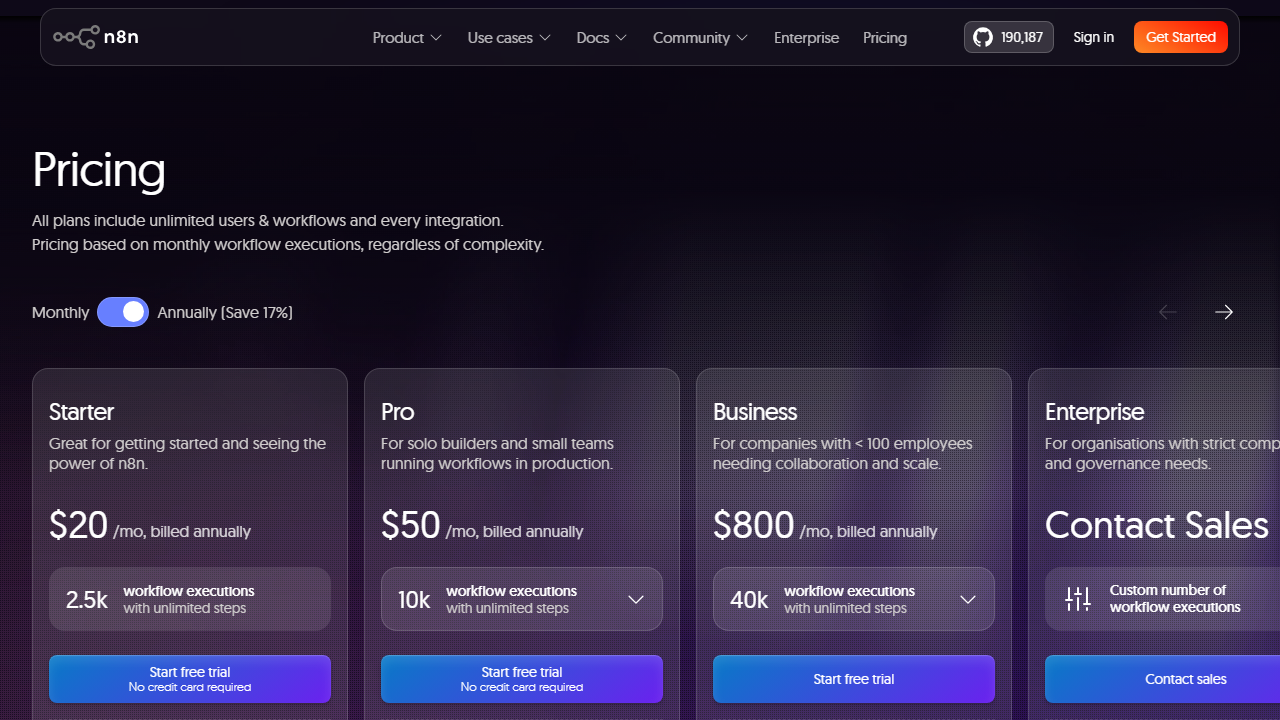
The Cloud Starter plan costs $24 per month and includes managed hosting, automatic updates, and email support. It suits small teams who want the benefits of n8n without server maintenance. I found the cloud instance responsive, and deployments were handled silently in the background.
The Cloud Pro plan is $60 per month and adds advanced user management, SAML single sign-on, and higher execution limits. This tier targets growing teams with multiple workflow builders. If you need enterprise-grade security, audit controls, and dedicated support, you can contact n8n for custom pricing.
I think the pricing is fair when you consider the cost of equivalent task volumes on proprietary platforms. Running ten thousand operations on n8n self-hosted costs you almost nothing beyond compute. On a per-task competitor, that same volume could cost hundreds of dollars per month.
What I Liked About n8n
The open-source model gives you freedom that locked platforms cannot match. I liked knowing that if n8n the company disappeared, the software would still run on my server. The fair-code license strikes a balance between community access and sustainable business development.
The AI node collection is impressive. Seventy-plus nodes covering LLMs, embeddings, and vector stores meant I could prototype AI workflows without wiring together half a dozen separate services. The LangChain nodes turned n8n from a simple automation tool into a lightweight AI agent platform.
Self-hosting was simpler than I expected. The Docker image is well maintained, and the documentation covers common deployment patterns. For anyone already comfortable with containers, getting n8n running is a low-friction experience.
Data transformation tools like the Set node and Function node give you power without forcing you to leave the visual builder. I could handle ninety percent of my logic with standard nodes and drop into code only when necessary. This hybrid approach kept my workflows readable.
Webhook triggers and HTTP requests mean you are never blocked by a missing integration. If a service has an API, you can connect it. This universal escape hatch is something I wish more platforms offered natively.
What Could Be Better
The visual builder works well for linear flows but can become cluttered with deeply nested branching. I found myself zooming in and out frequently when working with workflows that had more than fifteen nodes. A mini-map or collapsible sub-workflow feature would help here.
Expression syntax, while powerful, has a learning curve for non-technical users. If you are coming from a no-code background, the JSON dot-notation and handlebar-style references may feel intimidating at first. More inline examples or a guided expression builder would lower that barrier.
Execution history on the free cloud tier is limited. If you are debugging a complex workflow, you may find that older runs have been purged before you had a chance to inspect them. Self-hosted users can configure retention manually, but cloud users on lower tiers need to be mindful of this limit.
While the node library is large, some integrations lag behind official API updates. I noticed one marketing platform node was missing a recently released endpoint. The open-source nature means you can patch it yourself or use HTTP Request, but casual users may not have the skills or time to do that.
Who Should Use n8n?
n8n is best for technical teams, developers, and power users who want deep control over their automations. If you are comfortable reading API documentation and writing occasional JavaScript, n8n will feel like a natural fit. The self-hosted option makes it especially appealing to privacy-focused organizations.
Startups on tight budgets should seriously consider the free self-hosted tier. You get unlimited workflows and executions for the cost of a small server. As you grow, you can migrate to cloud hosting or keep running on your own infrastructure.
AI builders and LLM experimenters will appreciate the LangChain and vector store nodes. If you are prototyping agent workflows, n8n provides a visual way to test chains before moving them into production code. I found it faster to iterate in n8n than to redeploy a Python script every time I changed a prompt.
Pure no-code users may find n8n harder to learn than tools like Zapier or Lovable AI review. The expression syntax, webhook configuration, and self-hosting setup require more technical confidence. If you want the simplest possible experience and never want to see JSON, a more guided platform might serve you better.
n8n vs Competitors
Compared to Zapier, n8n offers more flexibility at a lower long-term cost. Zapier has a larger template library and a gentler learning curve, but its pricing scales aggressively with task volume. n8n wins on data control and custom logic, while Zapier wins on ease of use for beginners.
Against Make, n8n holds its own on visual design and surpasses it on self-hosting. Make has a more polished canvas experience and cheaper entry-level pricing, but n8n’s open-source model and AI nodes give it an edge for technical builders. Both are excellent, and your choice will depend on whether you value hosting control or user interface polish more highly.
Compared to Lovable AI review or dedicated AI platforms, n8n is more of a generalist. It will not generate code or design apps for you, but it will connect those apps to everything else in your stack. Think of n8n as the connective tissue rather than the creative engine.
My Verdict and Rating
After three weeks of daily use, I rate n8n 4.5 out of 5. The platform delivers exceptional value for technical users who want open-source flexibility, deep integrations, and modern AI agent support. The visual builder is capable, the node library is extensive, and the self-hosting option is a genuine differentiator.
I deducted half a point because the learning curve is steeper than on consumer-grade competitors, and the builder UI could use better navigation aids for large workflows. These are minor complaints in the context of what n8n achieves. For the right user, it is one of the best automation investments you can make in 2026.
If you are on the fence, I suggest starting with the free self-hosted version or the cloud trial. Build one real workflow that solves a problem in your business. Within a few days, you will know whether n8n fits your working style. For me, it earned a permanent place in my toolkit.
Frequently Asked Questions
Is n8n really free to use?
Yes, the self-hosted version is completely free under the fair-code license. You get the full feature set, unlimited workflows, and unlimited executions. You only pay for your own hosting infrastructure. The cloud versions charge a monthly fee for managed hosting and support.
Can I self-host n8n without technical skills?
Basic self-hosting requires familiarity with Docker or server administration. If you have never used the command line, the cloud plans are a better starting point. However, many hosting providers now offer one-click n8n installers that reduce the technical barrier significantly.
Does n8n support AI agent workflows?
Absolutely. n8n includes over seventy AI nodes, including LangChain agents, vector store connections, and embedding models. You can build retrieval-augmented generation pipelines, conversational agents, and automated classifiers without writing external code.
How does n8n compare to Zapier for beginners?
Zapier is easier for absolute beginners because it hides technical details behind a guided interface. n8n exposes more of the underlying logic, which gives you more power but requires more learning. If you are willing to invest a few hours, n8n rewards you with greater flexibility and lower costs.
What happens to my data when I use n8n cloud?
Data processed on n8n cloud stays within n8n’s managed infrastructure. The company follows standard security practices and offers encryption at rest and in transit. If you need full data sovereignty, the self-hosted option lets you keep everything on your own servers.
Can I migrate workflows from Zapier or Make to n8n?
There is no automatic importer, but the concepts map closely between platforms. You can rebuild most workflows in n8n by matching triggers and actions. The community has published migration guides for common patterns, and the template library often includes equivalents of popular Zapier zaps.
Does n8n have good error handling?
Yes. Every node can have a secondary output path for failures. You can retry failed steps, send alerts, or route errors to logging services. Execution history shows exactly which node failed and what data caused the problem, making debugging much faster than on simpler platforms.
How many integrations does n8n support?
n8n offers more than four hundred native integrations and counting. If a service has a public API, you can also use the HTTP Request node to connect it manually. The community regularly publishes new custom nodes for niche services.
Is n8n suitable for large enterprise deployments?
Yes, with the right setup. Enterprises can self-host n8n on Kubernetes clusters for high availability and scale. The Pro and Enterprise cloud plans include SAML, audit logs, and priority support. Several large organizations already use n8n for mission-critical workflows.
Can I run n8n on a Raspberry Pi?
You can run n8n on a Raspberry Pi 4 or newer using Docker. Performance will depend on the complexity of your workflows and concurrent execution volume. For personal automations and light business use, it works surprisingly well on low-power hardware.