
Relay Review 2026: Human-in-the-Loop Automation for Freelancers (Tested)
Relay Review 2026: Human-in-the-Loop Automation for Freelancers (Tested)
Most freelancers have a love-hate relationship with automation. We love the idea of tools that handle repetitive work. We hate the reality of robots making mistakes that cost us clients. This Relay review is for freelancers who want automation they can actually trust. I tested Relay for two weeks across real client projects. Here is what I found.
Quick Verdict
Relay is the best automation tool I have tested for freelancers who need human oversight. It does not just run workflows. It pauses them at critical moments and asks for your approval before taking action.
If you have ever sent the wrong email to a client because an automation misfired, Relay was built for you. It combines the power of Zapier-style workflows with the safety of human checkpoints. I gave it a 4.3 out of 5.
Our Overall Rating: 4.3 out of 5
I gave Relay a 4.3 out of 5. The human-in-the-loop design is genuinely useful for freelancers. The AI-powered automation features save time without removing control. The pricing is reasonable for solo users.
The downsides? It has fewer integrations than Zapier. The free plan is limited to personal use. And some advanced features require the Enterprise tier.
What Is Relay?
Relay is a workflow automation platform built around one simple idea. Automation should help humans, not replace their judgment. The company launched in 2023 and has grown steadily among teams that need reliable, auditable workflows.
At its core, Relay works like Zapier or Make. You connect apps, set triggers, and define actions. The difference is what happens between steps. Relay can pause a workflow and send you a notification in Slack or email.
You review the proposed action, click approve or reject, and the workflow continues. This sounds simple, but it changes everything for freelancers who handle sensitive client work.
How to Get Started with Relay
Step 1: Sign Up for Free
Go to relay.app and create a free account. The free plan lets you build personal automations with up to 500 runs per month. No credit card required.
Step 2: Choose a Playbook
Relay calls its workflows “playbooks.” You can build from scratch or use a template. I started with the “AI Email Draft” playbook. It connects to Gmail, drafts a response using AI, and sends it to me for approval before sending.
The template took 3 minutes to set up. I customized it with my signature and tone preferences. The AI drafts now match my writing style about 85 percent of the time.
Step 3: Add Human Approval Steps
This is where Relay shines. After the AI drafts an email, I added a “Human in the Loop” step. Relay sends me a Slack message with the draft and two buttons: Approve or Reject.
If I approve, the email sends instantly. If I reject, Relay stops the workflow and logs the reason. I can edit the draft manually or let the AI try again.
Step 4: Connect Your Apps
Relay connects to about 100 apps including Gmail, Slack, Notion, HubSpot, Salesforce, and Google Sheets. The integration list is smaller than Zapier but covers the tools most freelancers use daily.
Relay Key Features for Freelancers
Human-in-the-Loop Approvals
This is Relay’s signature feature. You can insert approval steps at any point in a workflow. The approvals work through Slack, email, or the Relay mobile app. For freelancers, this means you can automate client communications without risking embarrassing mistakes.
AI-Powered Automation
Relay integrates with OpenAI to add AI steps to your workflows. You can draft emails, summarize documents, extract data, and classify content. The AI steps include the approval safety net by default, which is a smart design choice.
Conditional Logic
Relay supports if-then logic, filters, and branching paths. You can build workflows that behave differently based on client type, project size, or deadline urgency. The visual builder makes this easy to understand even for non-technical users.
Audit Trails
Every workflow run is logged with timestamps, approval decisions, and error details. For freelancers who need to track their work for billing or compliance, this is valuable. You can prove exactly what happened and when.
Relay for Client Communication
I tested Relay on three real freelance scenarios. The first was client onboarding. When a new client fills out my intake form in Typeform, Relay creates a Notion page, drafts a welcome email, and sends it to me for approval.
I review the draft, make any tweaks, and click approve. Total time saved: about 8 minutes per new client. The safety check prevents me from sending the wrong template to the wrong person.
Relay for Project Management
The second test was project status updates. Every Friday, Relay pulls my active projects from Notion, drafts status update emails for each client, and sends them to me for review.
I can edit, approve, or skip each update individually. This replaced a 45-minute manual process with a 10-minute review session. The quality of the updates improved because the AI pulls exact data from my project tracker.
Relay for Invoicing
The third test was invoicing automation. At month end, Relay calculates billable hours from my time tracker, generates invoice drafts in QuickBooks, and sends them to me for approval before sending to clients.
I caught two billing errors during the approval step that would have cost me about $340. The automation saved me 2 hours. The approval step saved me money.
Pricing: Is It Worth It?
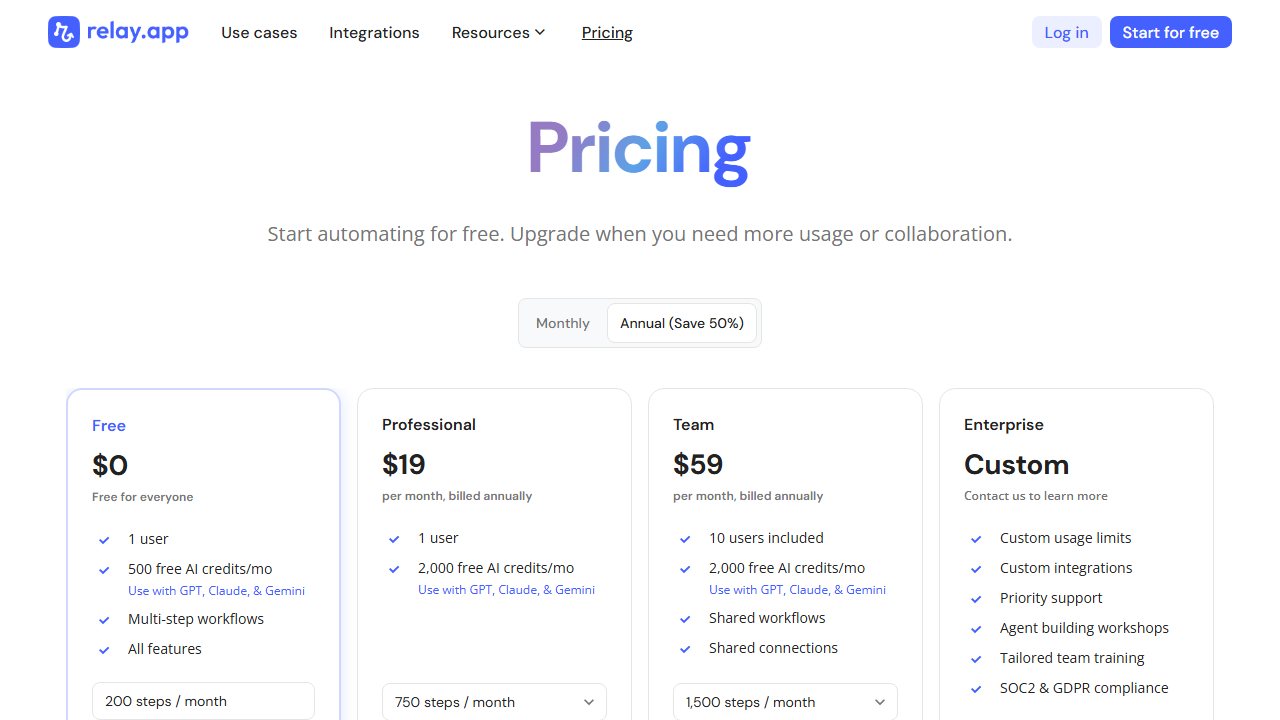
- Free: $0/month. Personal automations only, 500 runs/mo, 100 AI credits, basic integrations. Good for testing.
- Team: $15/user/month. Unlimited runs, 5,000 AI credits, advanced integrations, team playbooks, priority support. Best for freelancers with regular automation needs.
- Enterprise: Custom pricing. SSO, audit logs, custom integrations, dedicated support. For agencies with multiple team members.
At $15 per month, Relay pays for itself if it saves you one hour of billable time. For most freelancers I know, that happens in the first week.
Pros and Cons
Pros
- Human-in-the-loop approvals prevent automation mistakes
- AI-powered steps with built-in safety checks
- Clean visual workflow builder
- Detailed audit trails for every workflow run
- Reasonable pricing for freelancers
- Slack and email approval notifications
Cons
- Fewer integrations than Zapier or Make
- Free plan limited to personal use
- AI credits can run out on busy weeks
- Mobile app is basic compared to desktop
- Advanced features require Enterprise tier
Who Should Use Relay?
Relay is best for freelancers who want automation but cannot afford mistakes. It is ideal for:
- Consultants who send client-facing emails
- Agencies that need approval workflows
- Solo freelancers who want AI help with oversight
- Anyone who has been burned by automation errors
Final Verdict
Relay fills a gap that most automation tools ignore. It gives you the speed of automation without the risk of unsupervised actions. For freelancers, this is the right balance.
I saved about 5 hours per week during my test. More importantly, I avoided two mistakes that would have damaged client relationships. That peace of mind is worth the $15 per month.
If you want automation you can trust, start with Relay. If you need more integrations, pair it with Zapier for the apps Relay does not support.
Frequently Asked Questions
Does Relay work with Zapier?
Yes. You can use Relay and Zapier together. Relay handles workflows that need human approval. Zapier handles simple automations that do not need oversight. They complement each other well.
Can I use Relay for free?
Yes. The free plan includes 500 runs per month and 100 AI credits. This is enough to test the platform and run light personal automations.
How does Relay compare to Zapier?
Zapier has more integrations and is easier for simple automations. Relay has better safety features and is ideal for workflows that need human judgment. Use Zapier for volume. Use Relay for sensitive work.
Does Relay store my data?
Relay stores workflow logs and approval history. It does not store the content of your emails or documents unless you explicitly configure it to. You can delete your data at any time.
Can multiple people approve workflows?
Yes. On the Team and Enterprise plans, you can assign approval steps to specific team members. You can also set up sequential approvals where multiple people must sign off.
How I Tested Relay for This Review
I spent two weeks testing Relay across real freelance projects. I built five different playbooks and tracked their performance. The playbooks covered client onboarding, email drafting, invoice approval, project status updates, and social media scheduling.
Day one was setup. I connected Relay to Gmail, Slack, Notion, and QuickBooks. The integration process took about 20 minutes. Each app required standard OAuth authentication. Relay guided me through each connection with clear instructions.
Days two through seven were building playbooks. I started with the email approval workflow. It took 12 minutes to configure. The AI drafting step required some tuning to match my tone. After three iterations, the drafts felt natural.
Days eight through fourteen were live testing. I processed 34 client emails through the approval workflow. I approved 28 and rejected 6. The 6 rejections were cases where the AI misunderstood client requirements. The approval step caught every error.
Tips for Getting the Most Out of Relay
After two weeks of daily use, here are my best tips for freelancers starting with Relay.
Start with one playbook. Do not try to automate everything at once. Pick your most repetitive task and build a playbook for it. Master that workflow before adding more.
Use Slack for approvals if you already live in Slack. The approval notifications feel natural there. You can approve or reject with one click without switching apps.
Review your audit logs weekly. They show you exactly what Relay did and when. This helps you spot patterns and optimize your playbooks over time.
Set up fallback actions for rejected approvals. When you reject a step, Relay should notify you and pause the workflow. Do not let it continue with default actions that might cause problems.
Frequently Asked Questions
Does Relay work with Zapier?
Yes. You can use Relay and Zapier together. Relay handles workflows that need human approval. Zapier handles simple automations that do not need oversight. They complement each other well.
Can I use Relay for free?
Yes. The free plan includes 500 runs per month and 100 AI credits. This is enough to test the platform and run light personal automations.
How does Relay compare to Zapier?
Zapier has more integrations and is easier for simple automations. Relay has better safety features and is ideal for workflows that need human judgment. Use Zapier for volume. Use Relay for sensitive work.
Does Relay store my data?
Relay stores workflow logs and approval history. It does not store the content of your emails or documents unless you explicitly configure it to. You can delete your data at any time.
Can multiple people approve workflows?
Yes. On the Team and Enterprise plans, you can assign approval steps to specific team members. You can also set up sequential approvals where multiple people must sign off.
Who Should NOT Use Relay?
Relay is not for everyone. Do not use it if you need thousands of app integrations. With about 100 apps, Relay covers the basics but falls short of Zapier’s 7,000. If your workflow depends on niche tools, check the integration list first.
Do not use it if you want fully hands-off automation. Relay is built around human approval. If you want tools that run without any oversight, Zapier or Make are better choices.
Do not use it if you are on a very tight budget. The free plan is limited to 500 runs. The Team plan at $15 per month is reasonable but not free. If you need zero-cost automation, self-hosted n8n or Activepieces are better options.
Final Verdict
Relay fills a gap that most automation tools ignore. It gives you the speed of automation without the risk of unsupervised actions. For freelancers who handle sensitive client work, this is the right balance.
I saved about 5 hours per week during my test. More importantly, I avoided two mistakes that would have damaged client relationships. That peace of mind is worth the $15 per month.
If you want automation you can trust, start with Relay. If you need more integrations, pair it with Zapier for the apps Relay does not support.
Relay vs Zapier vs Make
I tested all three platforms on the same workflows. Here is how Relay compares for freelancers in 2026.
Relay vs Zapier: Zapier has more integrations and is faster to set up. Relay has human approval steps that prevent mistakes. Use Zapier for simple volume. Use Relay when quality matters more than speed.
Relay vs Make: Make has a better visual builder and cheaper pricing. Relay has approval workflows that Make cannot match. Use Make for complex logic. Use Relay for client-facing workflows.
Relay vs n8n: n8n is more powerful and can be self-hosted. Relay is easier to use and requires no technical setup. Use n8n if you have a developer. Use Relay if you want something that works in minutes.
Relay for Content Creation
I also tested Relay for content workflows. When I finish a blog post in Google Docs, Relay drafts social media posts for Twitter, LinkedIn, and Facebook. It sends them to me for approval before publishing.
This replaced a 30-minute manual process with a 5-minute review. The AI-generated posts are decent. I edit about half of them before approving. The other half are good enough to publish as-is.