
ChatGPT Review 2026: The Ultimate Guide for Freelancers (+ 100 Master Prompts)
Introduction: Why Every Freelancer Needs to Understand ChatGPT in 2026
The freelance economy has never been more competitive. Clients expect more output, faster turnaround, higher quality — and they’re not willing to pay more for it. In 2026, the freelancers who are thriving are not necessarily the most talented. They are the most efficient. And the single biggest efficiency advantage available to any freelancer right now is ChatGPT.
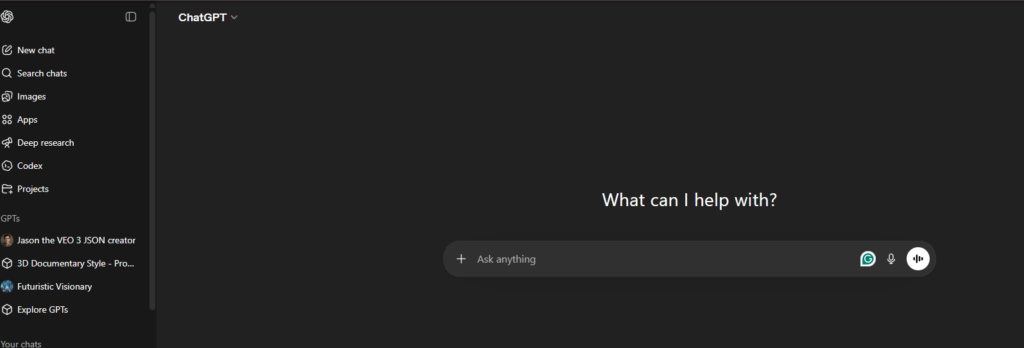
ChatGPT, developed by OpenAI, launched in late 2022 and quickly became the fastest-growing consumer application in history. By 2026, it has evolved far beyond a simple chatbot into a fully featured AI platform capable of writing, coding, researching, designing workflows, analyzing data, generating images, and executing complex multi-step tasks autonomously. For freelancers — whether you write, design, develop, consult, or market — ChatGPT is no longer a novelty. It is a professional tool as essential as your laptop.
This review is not a surface-level overview. We are going deep. We will cover every major feature of ChatGPT, how it specifically benefits freelancers across every major niche, real-world use cases from actual freelancers, a full breakdown of pricing, honest pros and cons, and finally — 100 master prompts designed to give you an immediate competitive edge the moment you start using them.
Whether you are a complete beginner wondering if ChatGPT is worth it, or an experienced user looking to squeeze more value out of your subscription, this guide has everything you need.
What Is ChatGPT? A Quick Overview for Freelancers
ChatGPT is an AI-powered language model built by OpenAI. It uses a technology called a Large Language Model (LLM) — a neural network trained on an enormous dataset of text from across the internet, books, code, academic papers, and more. The result is an AI that can understand context, generate coherent long-form text, follow complex instructions, write code, summarize documents, hold a conversation, and perform reasoning tasks with remarkable accuracy.
The current flagship model as of 2026 is GPT-5.3, with the Pro tier offering access to GPT-5.4 Pro — OpenAI’s most powerful reasoning model to date. These models are dramatically more capable than the GPT-3.5 that first made ChatGPT famous. They can handle nuance, avoid hallucinations far better than earlier versions, maintain context over extremely long conversations, and even reason through multi-step problems in a way that feels genuinely intelligent.
For freelancers, what matters is not the underlying technology but what it can do. And the answer, in 2026, is: almost anything that involves working with language, data, or logic. Let us explore exactly what that means across the key features.
Key Features of ChatGPT in 2026
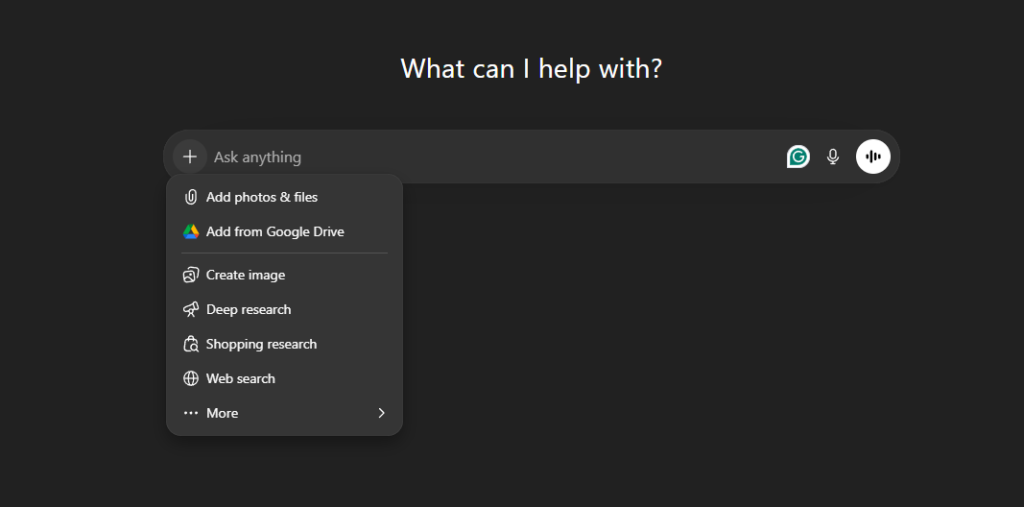
1. Multiple AI Models in One Platform
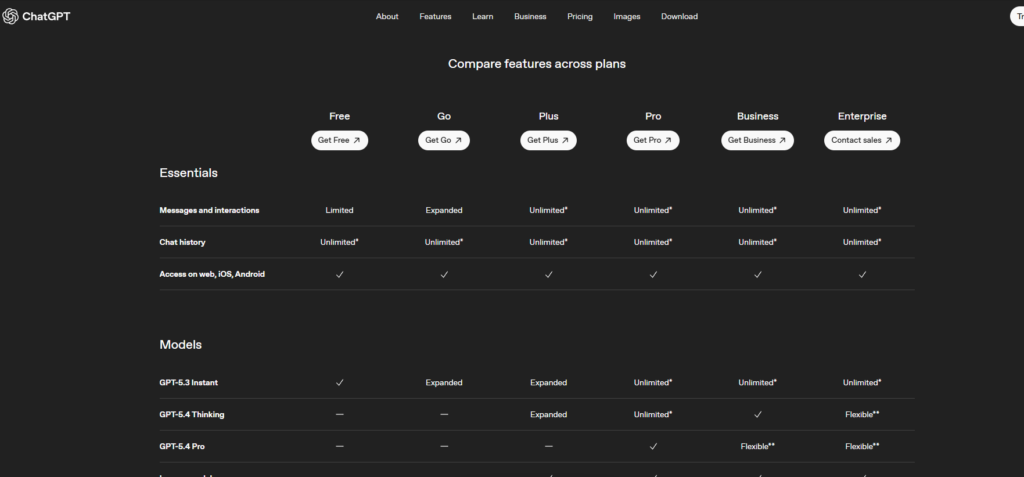
ChatGPT is no longer a single model. Depending on your plan, you have access to a range of models optimized for different tasks. The free tier gives you access to GPT-5.3 with limited messages. The Plus and Pro tiers unlock the full suite including advanced reasoning models, which are especially powerful for complex writing, analysis, and coding tasks. As a freelancer, this means you can choose the right model for the right task — use a faster model for quick email drafts and switch to the reasoning model when you need to tackle complex client proposals or technical documents.
2. Deep Research Mode
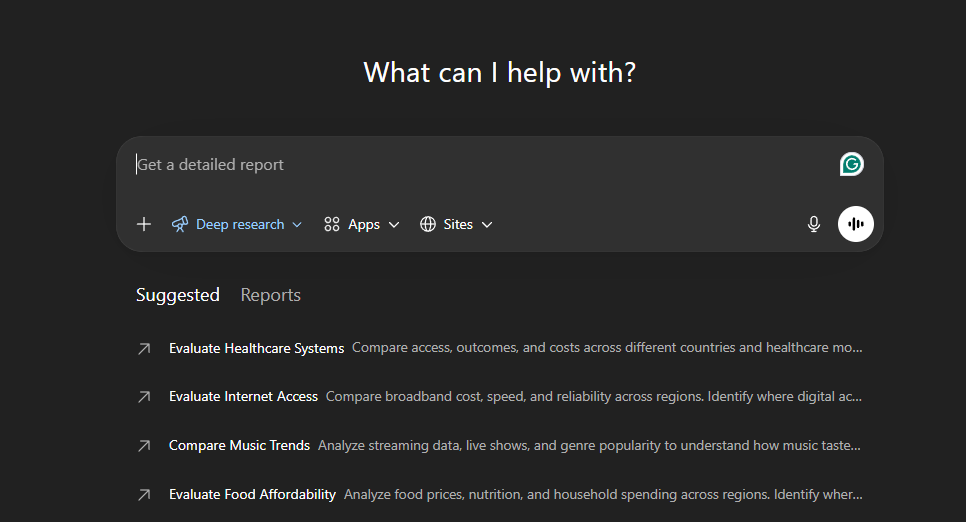
One of the most powerful additions to ChatGPT in 2026 is Deep Research mode. With this feature, ChatGPT can autonomously browse the web, synthesize information from dozens of sources, and produce a comprehensive, cited research report on virtually any topic. For freelancers who do content research, market analysis, or competitive intelligence, this is transformational. A research task that once took 3-4 hours can now be completed in 15 minutes — with better source coverage than most humans would manage manually.
3. Memory and Personalization
ChatGPT now has persistent memory. It remembers your preferences, your clients, your writing style, your typical deliverables, and your workflow preferences across sessions. This means the more you use it, the smarter it gets about serving you specifically. A freelance copywriter can set ChatGPT to remember that they write for a B2B SaaS audience, prefer a direct tone, and always need to include a CTA. Every future interaction will reflect that context without re-explaining it each time.
4. File Upload and Document Analysis
Freelancers deal with documents constantly — client briefs, contracts, research papers, competitor content, data files, and more. ChatGPT allows you to upload PDFs, Word documents, Excel files, CSVs, images, and more, and then ask questions about them, summarize them, extract data, or use them as reference material for new content. This is enormously practical. You can upload a 50-page client report and ask ChatGPT to extract the three key insights that should anchor your next deliverable.
5. Image Generation with DALL·E Integration
ChatGPT Plus and above include access to DALL·E image generation directly within the chat interface. For freelancers who create content, build decks, design social posts, or deliver visual concepts, this means you can generate custom images without leaving your workflow. While it does not replace a professional designer for pixel-perfect work, it is excellent for mockups, illustrations, concept visuals, and social media content.
6. Code Interpreter and Data Analysis
The Code Interpreter tool (now called the Advanced Data Analysis tool) allows ChatGPT to write and execute code within a sandboxed environment. For freelancers who work with data — whether you’re a virtual assistant cleaning spreadsheets, a marketer analyzing campaign results, or a developer building scripts — this feature is invaluable. You can upload a messy dataset and ask ChatGPT to clean it, analyze it, and produce charts, all without needing to know how to code yourself.
7. Custom GPTs and Projects
ChatGPT Plus users can create and use custom GPTs — specialized versions of ChatGPT configured with specific instructions, tools, and knowledge bases. For freelancers, this means you can build your own bespoke AI assistant for specific niches. A freelance SEO writer might create a custom GPT pre-loaded with their client’s brand guidelines, target keywords, and content style. A developer might create a GPT that knows their preferred tech stack inside and out. The Projects feature lets you organize conversations, files, and custom instructions by client or project — keeping your workspace as organized as you need it.
8. Voice Mode
ChatGPT’s voice mode has matured significantly. In 2026, you can have a fully natural spoken conversation with ChatGPT, including interrupting it, asking follow-up questions, and getting responses in a natural, conversational voice. For freelancers who work on the go, do client calls, or prefer to think out loud, voice mode turns ChatGPT into a genuine hands-free assistant.
9. Agent Mode and Task Automation
Perhaps the most exciting development in 2026 is Agent Mode. ChatGPT can now take multi-step actions autonomously — browsing the web, filling out forms, interacting with other applications, and completing sequences of tasks without needing you to prompt every step. For freelancers, this opens the door to true automation of repetitive workflows: prospecting, research, draft generation, basic client communications, and more.
ChatGPT for Freelancers: Use Cases by Niche
Freelance Writers and Content Creators
For freelance writers, ChatGPT is arguably the most powerful tool in existence. It does not replace a skilled writer — clients hire you for your judgment, your voice, your understanding of their audience, and your ability to craft arguments that land. But ChatGPT can dramatically accelerate every part of your process. You can use it to outline a 3,000-word article in two minutes, generate five different angle options for a piece, write a rough first draft that you then refine and elevate, overcome writer’s block by prompting it to continue a paragraph you’re stuck on, and research background information through Deep Research mode.
The real power is in the editing and refinement loop. Many experienced writers use ChatGPT not to write first drafts, but as an editorial partner — pasting in their draft and asking it to identify weak arguments, improve clarity, tighten sentences, or suggest a better structure. This collaborative approach produces better work, faster, while keeping the writer’s authentic voice in control.
Freelance writers who use ChatGPT effectively are reporting 2-4x increases in output with the same or better quality. That means more clients, higher revenue, or more free time — whichever you value most.
Freelance Copywriters and Marketers
Copywriters thrive with ChatGPT because it speaks the language of marketing. You can generate 10 headline options for an ad in 30 seconds. You can write a complete email sequence — welcome, nurture, and sales — in under an hour. You can produce landing page copy variations for A/B testing without the time investment that used to make testing prohibitively expensive. You can brainstorm campaign concepts, product positioning angles, and customer avatar profiles with a speed that makes creative block largely a thing of the past.
For freelance social media managers and content strategists, ChatGPT’s ability to generate a month of content ideas in one session is transformative. Combine this with a simple scheduling tool and you can deliver high-volume social content for multiple clients simultaneously without burning out.
Freelance Developers and Coders
The developer use case for ChatGPT is enormous. ChatGPT can write functional code in virtually every major programming language — Python, JavaScript, TypeScript, React, SQL, PHP, Ruby, Go, and more. It can debug your existing code by reading the error and suggesting a fix. It can explain code you’ve inherited and don’t understand. It can write unit tests, generate documentation, convert code between languages, and help you architect solutions to complex problems.
For freelance developers, this means you can take on projects slightly outside your core expertise knowing that ChatGPT can bridge the knowledge gaps. A front-end developer can take on a full-stack project because ChatGPT can help write the back-end logic. A Python developer can deliver a JavaScript module because ChatGPT can handle the translation. This expands your service offering and your earning potential significantly.
Junior developers who use ChatGPT are producing work at a senior level. Senior developers are completing projects in half the time. The productivity gains in development are among the most dramatic of any freelance niche.
Freelance Designers and Creative Professionals
While ChatGPT is primarily a text and code AI, its usefulness for designers is broader than most people expect. Designers use it to write creative briefs, generate moodboard descriptions, write design rationale documents for client presentations, draft project proposals, and produce UX copy for apps and websites. The DALL·E integration enables rapid concept visualization and mood boarding directly within the ChatGPT interface.
For graphic designers and brand strategists, ChatGPT is especially useful for client communication — drafting creative briefs, writing project scopes, composing follow-up emails, and producing the written deliverables that often accompany design work but drain time and energy.
Freelance Virtual Assistants
Virtual assistants are seeing some of the most dramatic productivity gains from ChatGPT. Tasks that once required hours of manual work — inbox management, meeting notes summarization, research, data entry and cleaning, drafting correspondence, scheduling communications, and more — can be largely automated or dramatically accelerated. A virtual assistant who can leverage ChatGPT effectively can handle the workload of three traditional VAs, either serving more clients or commanding premium rates as an “AI-enhanced VA.”
Freelance Consultants and Coaches
Consultants and coaches use ChatGPT to produce proposals, frameworks, presentations, client reports, SOPs (standard operating procedures), training materials, and workshop content. What once required days of document creation can be completed in hours. ChatGPT is also invaluable for research — quickly building your knowledge base on an industry or client’s business before a discovery call, synthesizing complex market data into clear client-facing insights, and generating case studies or examples to illustrate your recommendations.
How Freelancers Are Actually Using ChatGPT to Make Money
Beyond specific niches, there are several recurring patterns in how the most successful freelancers are monetizing their ChatGPT usage. These are not theoretical — these are approaches being used daily by real freelancers in 2026.
Expanding Service Offerings
ChatGPT allows freelancers to offer services they previously could not. A writer can now offer basic SEO analysis. A designer can now offer website copywriting. A developer can now offer technical documentation and user guides. By expanding into adjacent services using ChatGPT to support the work, freelancers increase their average project value and reduce client churn by becoming a more complete solution.
Raising Prices Through Better Quality and Speed
Counterintuitively, many freelancers are using ChatGPT not to do more work cheaply, but to do better work at premium prices. By using ChatGPT to elevate the quality of their output — more thoroughly researched, better structured, more polished — they are positioning themselves at the top of the market. When you can deliver a comprehensive content strategy document that would have taken a week in two days, and it’s better than the competition’s week-long effort, you justify premium rates.
Productizing Services
Some freelancers are using ChatGPT to build productized service packages — fixed-scope, fixed-price deliverables that can be produced at scale. For example, a copywriter might offer a “30-day social media content package” as a productized service. With ChatGPT, what once took a week of writing can be produced in a day. The service is priced at full market value, but the delivery cost (your time) is dramatically reduced. This is the clearest path to building a high-margin freelance business with ChatGPT.
Building Income Streams Beyond Client Work
Savvy freelancers are also using ChatGPT to build passive or semi-passive income streams. They produce digital products (ebooks, templates, prompt libraries, course materials) far faster than before. They build content websites that generate ad or affiliate revenue. They create YouTube scripts, newsletter content, and educational materials that build their personal brand and attract inbound leads. ChatGPT makes all of this content production viable for a solo operator.
ChatGPT Pricing in 2026: Which Plan Is Right for Freelancers?
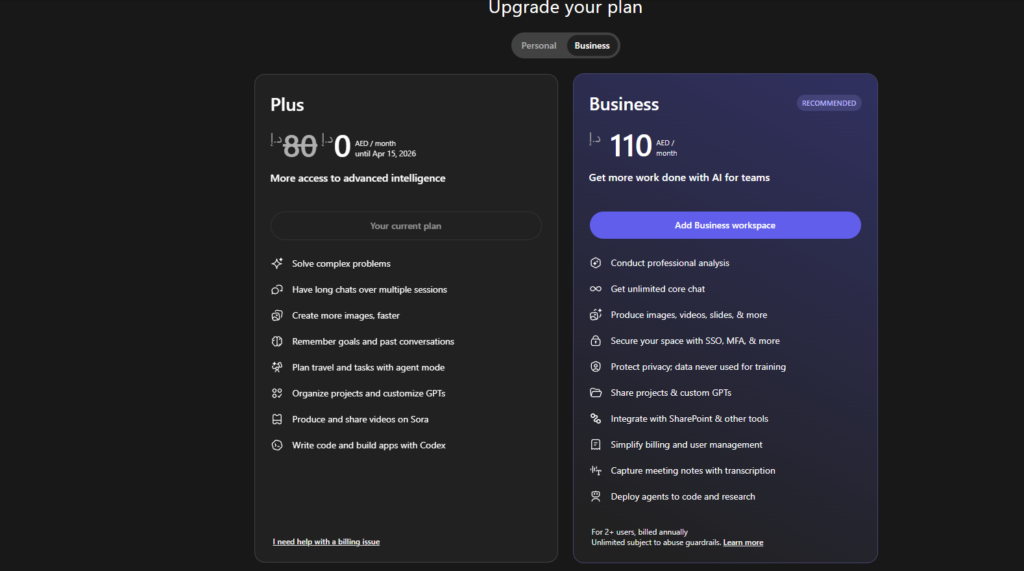
ChatGPT now offers four main individual pricing tiers. Here is a breakdown of each and what it means for freelancers:
Free Plan — $0/month
The free plan gives you access to GPT-5.3 with limited daily messages and uploads. You also get limited access to Deep Research and image generation. For freelancers just starting out or testing the waters, the free plan is a genuinely useful starting point. You can draft emails, brainstorm ideas, write short-form content, and get a feel for the tool without spending anything. However, the message limits will become a bottleneck quickly if you are using ChatGPT as a core part of your workflow. The free plan also includes ads in the Go tier, which some users find disruptive.
Go Plan — approximately $8/month
The Go plan offers more access to GPT-5.3, more messages, more uploads, more image generation, and longer memory. For very light professional users, this plan may be sufficient. However, for most freelancers doing serious work, the lack of advanced reasoning models and the continued message limits make this plan a stepping stone rather than a destination.
Plus Plan — $20/month
The Plus plan is the sweet spot for the vast majority of professional freelancers. It includes everything in Go plus access to advanced reasoning models, expanded deep research, Agent Mode, Projects, custom GPTs, Codex agent, and early access to new features. At $20 per month, this is an extraordinarily good investment for any freelancer. If ChatGPT saves you just one hour per week — which is a profoundly conservative estimate — it is paying for itself many times over at any reasonable freelance hourly rate. Most freelancers report saving 5-15 hours per week, making the Plus plan one of the highest ROI tools in their stack.
Pro Plan — $200/month
The Pro plan is designed for power users who need the absolute best performance ChatGPT can offer. It includes unlimited access to GPT-5.4, the most powerful reasoning model available, unlimited image generation, maximum Deep Research, maximum memory and context, and expanded Sora video generation. For freelancers doing high-value work where quality and speed are critical — senior consultants, lead developers, specialist content strategists — the Pro plan can absolutely be justified. At $200/month, you need to be generating at least $500-1000 per month in additional value from the premium features to make it worthwhile. Many high-earning freelancers find it a no-brainer.
Teams and Enterprise Plans
For freelancers who have grown into small agencies or studios, the Teams plan ($25-30 per user per month) offers collaborative features, a shared workspace, and admin controls. The Enterprise plan is aimed at larger organizations and offers custom pricing with enhanced security, compliance, and usage analytics.
Pros and Cons of ChatGPT for Freelancers
Pros
Unmatched versatility: No other tool can do so many different things at a high level of quality. Writing, coding, research, analysis, image generation, voice — all in one platform.
Continuous improvement: OpenAI ships updates constantly. The tool you use today is measurably better than the one from six months ago, and it will be better again in six months. Your investment compounds over time.
Free tier available: The barrier to entry is zero. You can start using ChatGPT today, for free, and upgrade only when the value is clear.
Natural language interface: You do not need to be technical to get enormous value from ChatGPT. If you can write a clear sentence, you can use this tool effectively.
Memory and personalization: The more you use it, the better it knows you, your clients, and your workflow. This compounds over time into a genuinely personalized tool.
Massive ecosystem: Custom GPTs, integrations, API access, and a huge community of users sharing prompts and use cases means the value of ChatGPT extends far beyond the base product.
Cons
Can produce inaccurate information: ChatGPT can hallucinate — generating plausible-sounding but factually incorrect content. For research-heavy work, you must always verify claims, especially statistics and specific factual assertions.
Requires good prompting skills: The quality of output depends significantly on the quality of input. Poorly structured prompts produce mediocre results. There is a learning curve to getting consistently excellent output.
Not a replacement for genuine expertise: ChatGPT can produce work that looks expert but lacks the depth of real experience. Clients hiring you for your specific knowledge and judgment are not hiring ChatGPT — they’re hiring you. The tool supports your expertise; it does not replace it.
Pro plan is expensive: At $200/month, the Pro plan is a significant cost for many freelancers, especially those just starting out.
Privacy considerations: Your conversations with ChatGPT are used to train models unless you explicitly opt out. For freelancers handling sensitive client information, this requires careful management — use the privacy settings or consider the Teams/Enterprise tiers with stronger data protections.
Message limits on lower tiers: The free and Go tiers have message limits that can be frustrating for heavy users. This can interrupt your workflow at inconvenient times.
Real Freelancer Experiences With ChatGPT
The most compelling evidence for ChatGPT’s value for freelancers comes from the freelancers themselves. Across communities like Reddit’s r/freelancers, Quora, and professional forums, the testimonials are remarkably consistent.
Freelance writers report using ChatGPT to handle research and outlining, then writing the actual article themselves — cutting total time from 6 hours to 2.5 hours per article. That’s a 58% reduction in time per piece, which translates directly to either more articles (more revenue) or more free time.
Freelance developers describe using ChatGPT to handle boilerplate code, documentation, and debugging, which they estimate saves them 2-3 hours per day on average. For a developer billing $75-150/hour, that’s $150-450 per day in recovered time — or $3,000-9,000 per month in theoretical additional capacity.
Virtual assistants who have added ChatGPT to their toolkit are positioning themselves as “AI-powered VAs” and charging 30-50% more than standard VA rates. They’re delivering better work, faster, and clients notice the difference.
Copywriters describe using ChatGPT for the “ugly first draft” — a rough pass that captures the key messages and structure, which they then elevate with their voice, experience, and creative judgment. The result is polished copy delivered at twice the usual speed.
One particularly compelling pattern is the use of ChatGPT for client acquisition and proposal writing. Crafting a compelling, customized proposal for each prospective client is time-consuming and often emotionally draining. With ChatGPT, freelancers can generate a strong proposal draft in 15-20 minutes by feeding it the job description, their relevant experience, and their pricing. They then review and personalize the draft. Win rates are reported to be equal to or better than hand-crafted proposals — at a fraction of the time investment.
How to Get Started with ChatGPT as a Freelancer
Getting started is straightforward. Visit chat.openai.com and create a free account. Spend your first session simply experimenting — ask it to write an email, outline an article, explain a concept in your field, or review a piece of your own writing. Get comfortable with the conversational interface before worrying about optimization.
Once you are comfortable with the basics, invest time in learning to write effective prompts. The difference between a vague prompt and a well-structured one is enormous. The prompts in the next section of this guide are designed to give you a significant head start on this learning curve.
From there, identify the two or three most time-consuming or repetitive tasks in your current workflow. These are your highest-value ChatGPT use cases. Build a habit of using ChatGPT for these specific tasks every day for two weeks. By the end of that period, you will have a clear sense of the time and quality gains — and you will have built the habit of using it before you consciously think about it.
Final Verdict: Is ChatGPT Worth It for Freelancers in 2026?
Yes. Unequivocally, yes — with nuance.
ChatGPT is not magic. It does not instantly make you a better freelancer. It does not replace your skills, your relationships, your reputation, or your judgment. Clients hire people, not tools. Your expertise, your reliability, and your ability to understand and solve their specific problem are what they’re paying for.
What ChatGPT does is remove the friction between your ideas and their execution. It compresses the time between conception and delivery. It handles the mechanical, repetitive, or research-intensive parts of your work so you can focus on the high-judgment, high-creativity, high-relationship work that actually differentiates you.
For most freelancers, the Plus plan at $20/month is the right starting point. It is one of the best ROI investments available in the freelance toolkit in 2026. If you find yourself using it heavily and want access to the most powerful models, consider the Pro plan — but verify the value before committing.
The freelancers who will fall behind in the next few years are not the ones who refuse to use AI. They are the ones who use it passively, without strategy, without skill, and without integrating it deeply into their practice. The ones who will thrive are those who develop genuine ChatGPT fluency — who understand its capabilities and limitations, use it intentionally, and keep improving their prompting practice.
Start today. The learning curve is short, the upside is enormous, and the cost of waiting is real.
100 Master Prompts for Freelancers: Your Complete Starter Library
The following 100 prompts are organized by category and designed to be immediately usable across every major freelance discipline. Copy them, customize them with your specific details, and start using them today. These are not generic examples — they are engineered to get professional-quality output that you can use directly in your work.
 Content Writing Prompts (1–15)
1. “Write a detailed outline for a [word count] blog post titled ‘[title]’ targeting [audience]. Include an introduction hook, 5 main sections with subpoints, and a conclusion with a clear CTA.”
2. “I’m writing an article about [topic] for [audience]. Here’s my rough draft introduction: [paste introduction]. Rewrite it to be more engaging, specific, and immediately valuable to the reader.”
3. “Generate 10 unique blog post title ideas for [topic] that would appeal to [target audience]. Make them specific, benefit-driven, and optimized for search intent.”
4. “Write a 500-word section for an article on [topic] that covers [specific subtopic]. The tone should be [conversational/authoritative/educational] and include one real-world example.”
5. “I need to write about [complex or technical topic] for a non-expert audience. Explain it in simple terms using an analogy a 10-year-old could understand, then build up to a professional-level explanation.”
6. “Here is a piece of content I’ve written: [paste content]. Edit it for clarity, flow, and concision. Identify any weak sentences and suggest stronger alternatives.”
7. “Write a compelling introduction paragraph for an article about [topic] that opens with a surprising statistic, asks a provocative question, or presents an unexpected contradiction.”
8. “Create a content brief for a [word count] SEO article targeting the keyword ‘[keyword]’. Include recommended structure, secondary keywords, questions to answer, and tone guidelines.”
9. “Write a conclusion for an article about [topic] that summarizes the key takeaways, reinforces the main argument, and ends with a strong call to action for [desired reader action].”
10. “I’m writing a case study about [company/client/situation]. Help me structure it as a compelling narrative: the challenge they faced, the solution implemented, and the measurable results achieved.”
11. “Generate a 30-day content calendar for a [type of business] targeting [audience]. Include topic ideas, content formats (blog, video, social), and the core message for each piece.”
12. “Rewrite this paragraph in three different tones: professional and authoritative, casual and conversational, and urgency-driven and direct. Paragraph: [paste paragraph].”
13. “Write a ‘what to include’ checklist for [type of content piece]. Make it practical and specific enough that a junior writer could use it independently.”
14. “I need to write about [topic] but I’m stuck. Give me 5 different angles or narrative frameworks I could use to approach this subject in a fresh, non-obvious way.”
15. “Research and summarize the top 5 arguments for and against [controversial topic in my industry]. Present both sides fairly and cite the key considerations a professional writer should address.”
 Copywriting and Marketing Prompts (16–30)
16. “Write 10 headline variations for a [product/service] ad targeting [audience]. Use different frameworks: curiosity gap, benefit-driven, fear of loss, social proof, and direct offer.”
17. “Write a full landing page for [product/service]. Include: headline, subheadline, benefit bullets, social proof section, FAQ, and CTA. Target audience: [describe]. Main benefit: [describe].”
18. “Write a 5-email welcome sequence for [business type]. Email 1: welcome and expectation-setting. Email 2: value delivery. Email 3: story/connection. Email 4: soft pitch. Email 5: strong offer.”
19. “Create 15 social media post variations to promote [product/service/content]. Include formats for LinkedIn, Instagram, and Twitter/X, with appropriate tone adjustments for each platform.”
20. “Write a sales email for [product/service] targeting [audience]. Use the PAS framework (Problem, Agitate, Solution). Keep it under 200 words and end with a single clear CTA.”
21. “Create a detailed customer avatar for [business type]. Include: demographics, goals, pain points, objections to buying, preferred communication channels, and the emotional language they use to describe their problems.”
22. “Write 5 versions of ad copy for [product/service] — one focusing on each of these angles: price/value, transformation, social proof, fear of loss, and curiosity.”
23. “I need to write a promotional email for [product/discount/event]. Make it feel urgent and exclusive without being manipulative. Target audience: [describe]. Send date: [date].”
24. “Write a cold outreach email to a [type of prospect] introducing my [service]. The email should feel personalized, be under 150 words, focus on one specific pain point, and end with a low-friction CTA.”
25. “Create a positioning statement and tagline for [business/personal brand]. The key differentiator is [X]. The target audience is [Y]. The main benefit delivered is [Z].”
26. “Write an about page for my freelance [specialty] business. Tone: [professional/warm/bold]. Key credibility points: [list them]. The goal is to convert visitors into inquiry submissions.”
27. “Give me 10 subject line options for a promotional email about [offer]. Optimize for open rates. Include curiosity-based, benefit-based, and question-based options.”
28. “Write the script for a 60-second video ad for [product/service]. Format: hook (5 sec), problem (10 sec), solution (20 sec), proof (15 sec), CTA (10 sec).”
29. “Analyze this landing page copy and tell me: what’s working, what’s weak, what’s missing, and what would you change first to improve conversion? [paste copy]”
30. “Write 3 testimonial request emails to send to satisfied clients. Each should be slightly different in tone — professional, friendly, and brief — and ask for specific details to make the testimonial useful.”
 Developer and Technical Prompts (31–45)
31. “Write a [language] function that [describe what it should do]. Include comments explaining what each section does and handle edge cases for [specific edge cases].”
32. “Here is a bug in my code: [paste code + error message]. Explain what’s causing it and provide a corrected version with an explanation of the fix.”
33. “Review this code for potential security vulnerabilities, performance issues, and style improvements: [paste code]. Prioritize your suggestions by severity.”
34. “I need to build [describe feature/app/script]. I’m using [tech stack]. Give me a step-by-step plan, the key components I’ll need to build, and any gotchas I should watch out for.”
35. “Write comprehensive documentation for this function/API endpoint: [paste code]. Include: description, parameters, return values, example usage, and error handling.”
36. “Convert this [language A] code to [language B], maintaining the same logic and adding appropriate comments: [paste code].”
37. “Write unit tests for this function using [testing framework]: [paste function]. Cover happy paths, edge cases, and failure scenarios.”
38. “Explain this code to me like I’m a junior developer who is new to [language/framework]: [paste code]. Break it down section by section.”
39. “I’m getting this error: [paste error]. I’m using [framework/library version] on [OS]. Here’s the relevant code: [paste code]. What are the most likely causes and solutions?”
40. “Write a SQL query that [describe what it needs to do] from a database with these tables and columns: [describe schema]. Optimize it for performance and explain what the query does.”
41. “Create a README.md for this project: [describe project]. Include: project description, prerequisites, installation instructions, usage examples, and contribution guidelines.”
42. “I need to refactor this code to be more readable and maintainable without changing its behavior: [paste code]. Explain the key changes you make and why.”
43. “Write a bash/Python script that [describe the automation task]. Include error handling and comments. The script will run on [OS/environment].”
44. “Help me design the database schema for [describe application]. Include tables, relationships, indexes, and explain the key design decisions.”
45. “I need to integrate [API/service] into my [tech stack] application. Walk me through the steps, show me example code for the key API calls, and highlight any common pitfalls.”
 Business, Proposals, and Client Management Prompts (46–60)
46. “Write a project proposal for [type of project] for a [type of client]. Include: executive summary, scope of work, timeline, deliverables, pricing, and terms. My rate is [X] and the project budget is [Y].”
47. “A client has asked me to do [task outside scope]. Write a professional, firm but friendly email declining the out-of-scope request and offering to include it in a new contract.”
48. “Write a client onboarding email sequence (3 emails) for new [freelance service] clients. Include: welcome and next steps, project kickoff details, and how to communicate throughout the project.”
49. “I need to raise my rates with existing clients. Write a professional email announcing a [X]% rate increase effective [date] that maintains the relationship and justifies the increase.”
50. “Write a follow-up email to a prospect who went silent after showing interest. It’s been [X] days. Keep it short, low-pressure, and end with an easy yes/no question.”
51. “A client is unhappy with a deliverable and has given me vague negative feedback. Write a professional email asking for specific, actionable feedback in a constructive way.”
52. “Write a late payment follow-up sequence: Email 1 (polite reminder at due date), Email 2 (firm reminder 7 days late), Email 3 (final notice 14 days late before escalation).”
53. “Help me write a freelance contract clause for [specific situation: revisions, kill fee, ownership, NDA, etc.]. Make it clear, professional, and protective of both parties.”
54. “I’m preparing for a discovery call with a potential [type of client]. Generate 15 questions I should ask to understand their needs, goals, budget, timeline, and decision-making process.”
55. “Write a project retrospective template I can complete with clients at the end of each project. Include sections for: what went well, what could improve, results achieved, and testimonial request.”
56. “Help me create a service package for [freelance niche]. Include 3 tiers (basic, standard, premium) with clear deliverables, timelines, and prices. My hourly rate is [X].”
57. “Write my freelancer bio for [platform — LinkedIn, Upwork, personal website]. Highlight: [your specialization], [years of experience], [key results you’ve achieved for clients]. Make it 150 words.”
58. “I need to politely decline a project that is not a good fit. The reason is [X]. Write a short, professional rejection that keeps the door open for future work.”
59. “Create a project status update email template I can customize weekly for clients. It should cover: work completed this week, work planned for next week, any blockers, and action items for the client.”
60. “Help me build a case study from this project: Client: [type]. Challenge: [describe]. Solution: [what I did]. Result: [outcomes]. Format it as a compelling 400-word narrative.”
 SEO and Research Prompts (61–72)
61. “Generate a list of 20 long-tail keyword opportunities around the topic [main keyword] for a [type of website/blog]. Include estimated search intent for each.”
62. “Analyze this blog post and give me an SEO audit: title tag, meta description, heading structure, keyword usage, internal linking opportunities, and readability. Post URL/content: [paste].”
63. “Write an SEO-optimized meta title (under 60 characters) and meta description (under 155 characters) for a page about [topic] targeting the keyword [keyword].”
64. “Research and summarize the current state of [industry/topic] in 2026. What are the major trends, the key players, the main challenges, and the biggest opportunities? Cite key data points.”
65. “I’m writing a [topic] article. What questions does my target reader (a [describe reader]) most likely want answered? List 15 specific questions organized from most to least pressing.”
66. “Compare and contrast [Tool/Option A] vs [Tool/Option B] for [use case]. Create a structured comparison covering features, pricing, pros, cons, and a clear recommendation for different user types.”
67. “Summarize the key findings from this research paper/report in plain English and explain their practical implications for [target audience]: [paste or describe source].”
68. “What are the most common objections [target audience] has to [product/service/idea]? List 10 objections and suggest how to address each one in content or copy.”
69. “Perform a competitor content gap analysis for [my website/niche]. Here are topics my competitor covers: [list]. Here are topics I cover: [list]. What are the most valuable gaps I should fill?”
70. “Write 5 different FAQs for [topic or product page] that target voice search queries and featured snippet opportunities.”
71. “I need to understand [technical/complex topic] quickly before a client call tomorrow. Give me the key concepts I need to know, common terminology, typical questions clients ask, and things to watch out for.”
72. “Create a detailed buyer’s journey for [product/service type]. Map the awareness, consideration, and decision stages, including what content works best at each stage.”
 Creative and Design-Adjacent Prompts (73–82)
73. “Write a creative brief for a branding project for [type of business]. Include: brand personality, target audience, tone of voice, visual direction, key messages, and competitors to reference.”
74. “Generate 10 brand name ideas for a [type of business] that [describe what it does]. Each name should be memorable, easy to spell, and have a domain name likely to be available.”
75. “Write UX copy for a [type of app/website]. I need: onboarding screen text (3 screens), error messages (5 scenarios), empty state messages (3 screens), and success confirmation messages (3 scenarios).”
76. “Describe a visual moodboard for [brand/project]. Include: color palette with hex codes, typography direction, image style, layout feel, and 5 reference brands that capture the aesthetic.”
77. “Write the script for a 2-minute explainer video for [product/service]. Make it conversational, avoid jargon, and include notes for visuals at each section.”
78. “Generate a creative concept for a social media campaign to launch [product/event]. Include the core theme, hashtag ideas, 5 post concepts across the campaign, and a launch day strategy.”
79. “Write a design rationale document for [design project]. Explain the key design decisions made, the reasoning behind them, and how they serve the client’s business goals.”
80. “I’m creating a presentation for [audience] on [topic]. Give me a slide-by-slide outline with the key message, supporting points, and suggested visual for each slide. Total slides: [number].”
81. “Write 5 image generation prompts for DALL·E or Midjourney that would create compelling visuals for [topic/article/brand]. Be specific about style, composition, color, and mood.”
82. “Create a style guide summary for [brand]. Include: logo usage rules, color palette, typography, tone of voice guidelines, do’s and don’ts. Based on these brand values: [list].”
 Productivity and Workflow Prompts (83–100)
83. “I have [list your tasks for the day]. Help me prioritize them using the Eisenhower Matrix (urgent/important quadrants) and suggest a time-blocked schedule for an 8-hour workday.”
84. “I’m overwhelmed with [project]. Help me break it down into a step-by-step action plan with estimated time for each step and logical sequencing.”
85. “Create an SOP (Standard Operating Procedure) for [recurring task in my freelance business]. Make it detailed enough that someone else could follow it without my involvement.”
86. “I spend too much time on [specific task]. Brainstorm 5 ways I could use AI tools, templates, or automation to reduce the time I spend on this by at least 50%.”
87. “Help me write a pitch to [platform/publication/podcast] to contribute [article/episode/content]. My credentials: [list]. My proposed topic: [describe]. Why their audience would love it: [explain].”
88. “Review my freelance service offering and pricing. Here’s what I currently offer: [describe]. Here’s my target client: [describe]. Suggest how I could repackage or reposition this to command higher rates.”
89. “I want to niche down from [broad service] to [specific niche]. Help me identify the 3 most profitable sub-niches, the types of clients in each, and how to position my services for each.”
90. “Write a LinkedIn post announcing [achievement/new service/insight] that will appeal to [target audience]. Make it personal, specific, and end with a question to drive engagement.”
91. “I’m preparing for a salary/rate negotiation with a client. Give me the key arguments I should make, the objections I’m likely to face, and specific language I can use to hold my position confidently.”
92. “Create a template for my end-of-month client report. Include sections for: work completed, results achieved, time spent, upcoming work, and any recommendations. Keep it professional and under one page.”
93. “I want to create a signature system or framework for my [consulting/coaching/service] work that I can name and market as a unique methodology. Help me structure it into clear phases or steps based on [describe your approach].”
94. “Write 5 variations of my elevator pitch for different contexts: networking event, LinkedIn profile, in-person cold introduction, email signature bio, and speaking introduction.”
95. “Help me audit my current client roster. For each of these clients [describe them briefly], rate them on: profitability, enjoyment, growth potential, and ease of working with. Then recommend who to prioritize, nurture, and potentially offboard.”
96. “I want to start a newsletter for [target audience] about [topic]. Help me: name it, define the value proposition, outline the format for each issue, and write my first edition introduction.”
97. “Write a set of onboarding questions to send new clients before our first project meeting. The questions should help me understand: their goals, their audience, their brand voice, past experiences with freelancers, and definition of success.”
98. “I need to explain a complex concept from my field to a non-expert client: [describe concept]. Write a clear, jargon-free explanation with a practical example they will immediately understand.”
99. “Act as my business coach. I’m a freelance [specialty] making [current income]. My goal is to reach [target income] in [timeframe]. Ask me the five most important questions you’d need answered to help me build a plan to get there.”
100. “You are my senior editor/business advisor/technical mentor [choose the role relevant to your work]. I’m going to share my work with you regularly. Your job is to give me honest, constructive, specific feedback — not to flatter me, but to help me get genuinely better. Here is today’s work: [paste work].”
Conclusion: Your Competitive Edge Starts Now
ChatGPT is the most significant productivity tool to enter the freelance market in a generation. In 2026, it is no longer a curiosity or an experiment — it is the operating system of the modern high-performing freelancer. The gap between freelancers who use it skillfully and those who do not is growing every month.
The 100 prompts above are your starting point. But the real edge comes from building a daily practice — from developing the habit of reaching for ChatGPT as naturally as you reach for your email or your calendar. The freelancers who invest in this skill now will have a compounding advantage that becomes harder to close over time.
Start with the prompts most relevant to your current workflow. Master those. Then expand. And never stop refining your prompting practice — it is a skill that pays dividends for as long as you freelance.
The future of freelancing is not AI replacing you. It is AI-powered freelancers replacing the ones who refused to adapt. Be the former.
Ready to start? Try ChatGPT free today and use the prompts above to hit the ground running.