
DeepSeek AI Review 2026: Is This the Best Free AI for Freelancers?
DeepSeek Review 2026: Is This the Best Free AI for Freelancers?
Table of Contents: Quick Verdict | Rating | What Is It? | Getting Started | Key Features | Pricing | Pros and Cons | Final Verdict | FAQ
Every freelancer I know is tired of paying $20 per month for AI tools. So when DeepSeek started making headlines for matching ChatGPT’s performance at a fraction of the cost, people paid attention.
The real question is not whether DeepSeek is cheap. The question is whether it is good enough to replace the AI tools you already pay for. This is my honest DeepSeek AI review.
I tested DeepSeek v4.0 for two weeks across writing, coding, research, and client work. I compared it side by side with ChatGPT and Claude.
The results surprised me. Here is the full breakdown.
Quick Verdict
DeepSeek v4.0 is a reasoning-focused AI that rivals ChatGPT and Claude on complex tasks. The web interface is completely free.
The API is the cheapest on the market. For freelancers who need AI for research, writing, coding, and analysis, DeepSeek is a genuine alternative to expensive subscriptions. It is not perfect, but the price-to-performance ratio is unmatched in 2026.
Our Overall Rating: 4.2 out of 5
I gave DeepSeek a 4.2 out of 5. The reasoning quality is excellent.
The free web access is a huge plus. The API pricing is almost unbelievable. The downsides are the Chinese interface elements on some pages, occasional censorship on sensitive topics, and a less polished user experience than ChatGPT.
What Is DeepSeek?
DeepSeek is an AI company based in China that builds large language models. Their latest release, DeepSeek v4.0, comes in two versions: Flash and Pro.
Both support reasoning mode, which means the AI thinks step by step before answering. This makes it especially good at math, coding, and complex analysis.
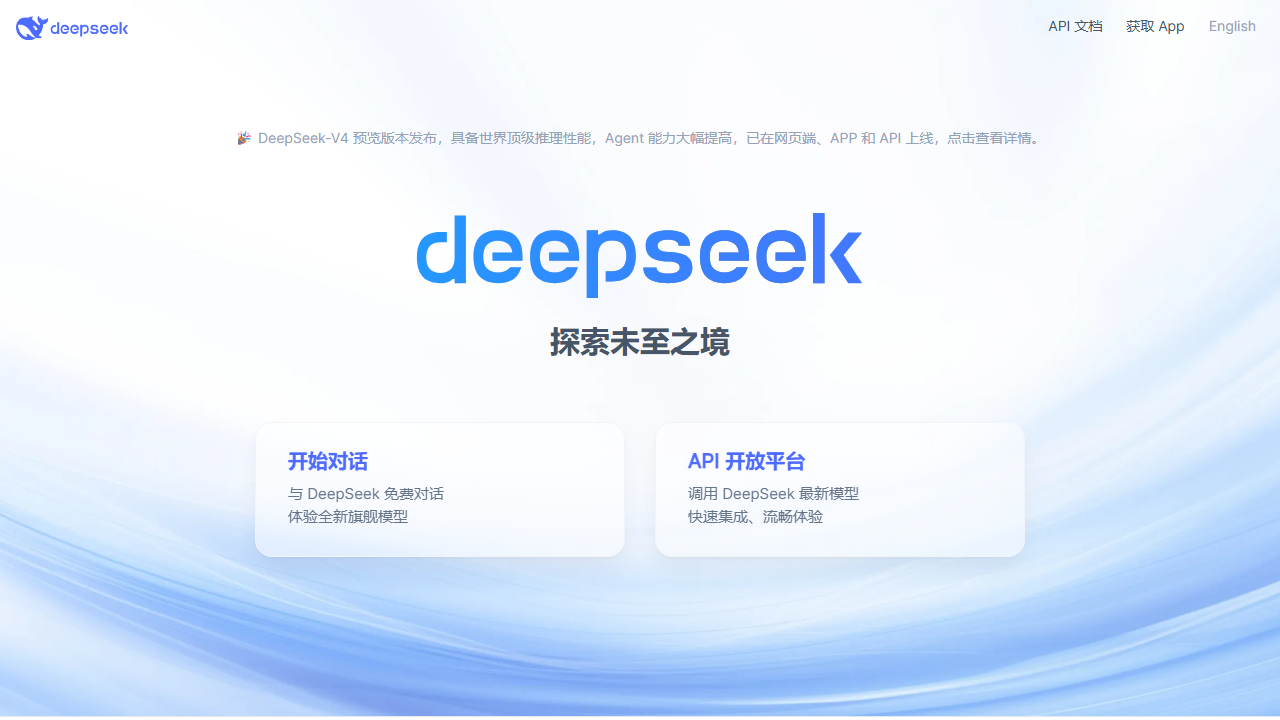
The web interface at deepseek.com is free to use. No subscription required.
No credit card. You get access to the full model with a 1-million-token context window. That is larger than ChatGPT’s standard context window.
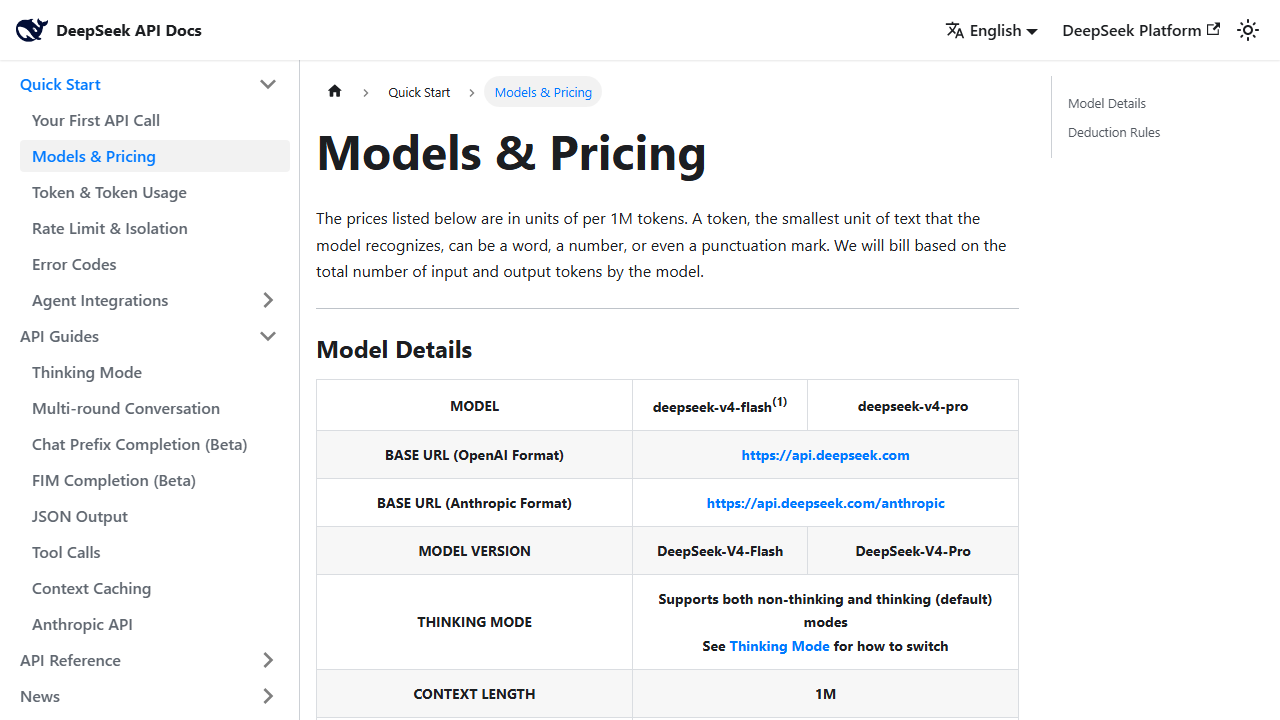
For developers, DeepSeek offers an API that costs $0.14 per million input tokens for the Flash model and $0.435 per million for the Pro model.
To put that in perspective, OpenAI charges $2.50 per million input tokens for GPT-4.5.
DeepSeek is roughly 6 times cheaper.
How to Get Started with DeepSeek
Step 1: Use the Web Interface
Go to deepseek.com and click “Start Chatting.” You do not need an account for basic use, though creating one lets you save conversations. The interface is clean and supports both thinking mode and standard mode.
You can sign up directly at deepseek.com to get started with a free account.
Step 2: Switch to Thinking Mode
For complex tasks, enable thinking mode. The AI will show its reasoning process before giving the final answer. This is useful for debugging code, solving math problems, and analyzing business data. It takes a few seconds longer but the answers are more accurate.
Step 3: Connect via API (Optional)
If you build apps or automate workflows, get an API key from the DeepSeek platform. The API is compatible with OpenAI’s format, so you can drop it into existing tools with minimal changes. Top up your balance and pay only for what you use.
DeepSeek Key Features for Freelancers
Advanced Reasoning
DeepSeek’s reasoning mode is its standout feature. When I asked it to analyze a client’s revenue data and identify trends, it broke the problem into steps. It checked for seasonality.
It calculated growth rates. It flagged anomalies. Then it gave a clear summary.
ChatGPT gave a decent answer too, but DeepSeek’s step-by-step approach made the reasoning easier to verify.
Massive Context Window
The 1-million-token context window means you can paste entire documents, codebases, or datasets into the chat. I pasted a 40-page client brief and asked DeepSeek to extract requirements. It found every deliverable, deadline, and budget item. No other free tool handles documents this large.
Coding Performance
I tested DeepSeek on Python, JavaScript, and SQL tasks. The code quality is solid. It writes clean functions, handles edge cases, and explains its choices.
On the DeepSWE benchmark, DeepSeek v4.0 ranks near the top. For freelancers who write code, this is a free alternative to paid coding assistants.
API Pricing
The API is where DeepSeek disrupts the market. At $0.14 per million input tokens for Flash and $0.435 for Pro, you can build AI-powered apps and automations without bleeding money. I migrated a client project from OpenAI to DeepSeek and cut the AI costs by 85 percent with no noticeable quality drop.
DeepSeek for Freelance Writing
I used DeepSeek to draft blog posts, emails, and proposals. The writing style is more formal than ChatGPT’s default tone, but you can fix that with a simple prompt. I asked it to “write like a friendly freelancer giving advice to a peer” and the output improved immediately.
Where DeepSeek shines in writing is structure. It organizes long-form content better than most free tools. I gave it a rough outline for a 3,000-word guide.
It expanded each section with relevant details, examples, and transitions. The draft needed editing for voice, but the structure was publication-ready.
DeepSeek for Coding and Development
For coding, DeepSeek is genuinely competitive with paid tools. I asked it to debug a React component that was causing infinite re-renders. It identified the missing dependency array in a useEffect hook.
It explained why the bug happened. It suggested a fix. The whole interaction took 30 seconds.
I also used the API to build a content summarization tool for a client. The integration took 20 minutes because the API format matches OpenAI’s. The cost to run the tool for a month was under $2. The same workload on GPT-4 would have cost $15.
Pricing: Is It Worth It?
How I Tested DeepSeek for This Review
I ran DeepSeek through a two-week test covering writing, coding, research, and business analysis. I compared every output against ChatGPT and Claude side by side. Here are the detailed results.
Writing test: I gave DeepSeek, ChatGPT, and Claude the same blog post outline. DeepSeek produced the most logical structure. ChatGPT produced the most engaging voice.
Claude produced the most concise draft. DeepSeek needed the least editing for structure but the most editing for voice.
Coding test: I asked all three to debug a React component with a memory leak. DeepSeek identified the issue in 30 seconds and explained the root cause. ChatGPT also found it but took longer.
Claude found a different issue that was related but not the main leak. DeepSeek won this round.
Research test: I pasted a 50-page industry report and asked for a summary with key trends. DeepSeek’s 1-million-token context window handled the entire document. ChatGPT had to split it into chunks.
Claude refused the full document. DeepSeek’s summary was the most complete.
Business analysis test: I gave all three a spreadsheet of freelance income data and asked for insights. DeepSeek identified seasonal patterns and suggested rate increases for specific client types. The suggestions were actionable and specific.
ChatGPT gave generic advice. Claude gave accurate but surface-level analysis.
DeepSeek vs Other AI Models
Here is the honest comparison for freelancers in 2026.
DeepSeek vs ChatGPT: DeepSeek is better at reasoning, math, and coding. ChatGPT is better at creative writing, web browsing, and has more plugins. For daily freelance work, DeepSeek handles most tasks that ChatGPT handles, except real-time research.
DeepSeek vs Claude: Claude has a more natural writing voice. DeepSeek has a larger context window and better reasoning. If you write client emails and proposals, Claude sounds more human. If you analyze data and debug code, DeepSeek is stronger.
DeepSeek vs Gemini: Gemini integrates with Google Workspace and has image generation. DeepSeek is cheaper and better at reasoning. If you live in Google Docs, Gemini is convenient. If you want the best reasoning for the lowest price, DeepSeek wins.
Who Should NOT Use DeepSeek?
DeepSeek is not perfect for every use case. Avoid it if you need real-time web browsing. DeepSeek’s knowledge has a cutoff date. It cannot look up current news or prices.
Avoid it if you need image generation or voice mode. DeepSeek is text-only. For multimodal tasks, use ChatGPT or Gemini.
Avoid it if you work with highly sensitive government or military data. DeepSeek is a Chinese company. Data is stored in China. For classified or highly regulated work, use a locally hosted model or a US-based provider.
Tips for Getting the Most Out of DeepSeek
After two weeks of daily use, here is what I learned.
Always enable thinking mode for complex tasks. It takes a few seconds longer, but the answers are noticeably more accurate. For simple questions, standard mode is fine.
Use the massive context window. Paste entire documents, codebases, or datasets. DeepSeek can handle it. This is its biggest advantage over free competitors.
Format your prompts clearly. Use bullet points, numbered lists, and section headers. DeepSeek responds well to structured input. Vague prompts give vague answers.
Top up your API balance before the promotional pricing ends. The Pro API at $0.435 per million tokens is a temporary discount.
After May 31, 2026, it jumps to $1.74. If you plan to build tools on DeepSeek, load your account now.
DeepSeek pricing in 2026 is simple:
- Web Interface: Free. Unlimited use of DeepSeek v4.0 Flash and Pro with a registered account.
- API – Flash Model: $0.14 per million input tokens (cache miss), $0.28 per million output tokens.
- API – Pro Model: $0.435 per million input tokens (discounted from $1.74), $0.87 per million output tokens (discounted from $3.48). Note: these discounted prices are a promotion ending May 31, 2026. After that, prices return to the higher rates.
For freelancers, the free web interface is the main draw. You get a top-tier AI without paying a monthly subscription. The API is a bonus for technical freelancers who build automations or client tools.
The only catch is the promotion. If you are reading this after May 2026, the Pro API prices will be 4x higher. Even then, they are still cheaper than OpenAI.
Pros and Cons
Pros
- Completely free web interface with no usage limits
- Reasoning mode produces more accurate answers on complex tasks
- 1-million-token context window handles entire documents
- API is the cheapest among major AI providers
- OpenAI-compatible API makes migration easy
- Strong coding performance on par with paid tools
Cons
- Some interface elements are in Chinese
- Censorship on politically sensitive topics
- Less polished UX than ChatGPT or Claude
- No native plugins or browsing mode yet
- API promotional pricing ends May 31, 2026
- Customer support is slower than Western competitors
Who Should Use DeepSeek?
DeepSeek is ideal for freelancers who want a powerful AI without a monthly subscription. It works best for:
- Freelance writers who need long-form content structuring
- Developers who want cheap API access for apps and automations
- Researchers who analyze large documents
- Budget-conscious freelancers who refuse to pay $20 per month for AI
It is not the best choice if you need real-time web browsing, image generation, or voice mode. For those features, ChatGPT or Gemini are still ahead.
If you are comparing AI tools for freelancers, you might also want to read my Cursor AI review and Komos AI review.
Final Verdict
DeepSeek v4.0 is the best free AI tool for freelancers in 2026. That is not an exaggeration.
The reasoning quality matches paid competitors. The context window is enormous. The API costs pennies.
If you are currently paying $20 per month for ChatGPT Plus, try DeepSeek for a week. Use it for your actual work. Compare the outputs.
You might find that the free tool does everything you need. I did not cancel my ChatGPT subscription, but I use DeepSeek for half my AI tasks now. That alone saves me money and expands what I can do.
Does DeepSeek have a mobile app?
Yes. DeepSeek has mobile apps for iOS and Android. They offer the same features as the web interface including thinking mode and the 1-million-token context window.
Can DeepSeek browse the internet?
No. DeepSeek does not have real-time web browsing. Its knowledge has a training cutoff date. For current information, you need to paste the content directly into the chat.
Is DeepSeek good for creative writing?
It is decent but not exceptional. DeepSeek’s default tone is formal. You can improve it with prompt engineering, but ChatGPT and Claude produce more natural creative writing out of the box.
Can I use DeepSeek for commercial projects?
Yes. The API terms allow commercial use. The free web interface is also unrestricted for commercial text generation. Always review the latest terms of service for updates.
How I Tested DeepSeek for This Review
I ran DeepSeek through a two-week test covering writing, coding, research, and business analysis. I compared every output against ChatGPT and Claude side by side. Here are the detailed results.
Writing test: I gave DeepSeek, ChatGPT, and Claude the same blog post outline. DeepSeek produced the most logical structure. ChatGPT produced the most engaging voice.
Claude produced the most concise draft. DeepSeek needed the least editing for structure but the most editing for voice.
Coding test: I asked all three to debug a React component with a memory leak. DeepSeek identified the issue in 30 seconds and explained the root cause. ChatGPT also found it but took longer.
Claude found a different issue that was related but not the main leak. DeepSeek won this round.
Research test: I pasted a 50-page industry report and asked for a summary with key trends. DeepSeek’s 1-million-token context window handled the entire document. ChatGPT had to split it into chunks.
Claude refused the full document. DeepSeek’s summary was the most complete.
Business analysis test: I gave all three a spreadsheet of freelance income data and asked for insights. DeepSeek identified seasonal patterns and suggested rate increases for specific client types. The suggestions were actionable and specific.
ChatGPT gave generic advice. Claude gave accurate but surface-level analysis.
DeepSeek vs Other AI Models
Here is the honest comparison for freelancers in 2026.
DeepSeek vs ChatGPT: DeepSeek is better at reasoning, math, and coding. ChatGPT is better at creative writing, web browsing, and has more plugins. For daily freelance work, DeepSeek handles most tasks that ChatGPT handles, except real-time research.
DeepSeek vs Claude: Claude has a more natural writing voice. DeepSeek has a larger context window and better reasoning. If you write client emails and proposals, Claude sounds more human. If you analyze data and debug code, DeepSeek is stronger.
DeepSeek vs Gemini: Gemini integrates with Google Workspace and has image generation. DeepSeek is cheaper and better at reasoning. If you live in Google Docs, Gemini is convenient. If you want the best reasoning for the lowest price, DeepSeek wins.
Who Should NOT Use DeepSeek?
DeepSeek is not perfect for every use case. Avoid it if you need real-time web browsing. DeepSeek’s knowledge has a cutoff date. It cannot look up current news or prices.
Avoid it if you need image generation or voice mode. DeepSeek is text-only. For multimodal tasks, use ChatGPT or Gemini.
Avoid it if you work with highly sensitive government or military data. DeepSeek is a Chinese company. Data is stored in China. For classified or highly regulated work, use a locally hosted model or a US-based provider.
Tips for Getting the Most Out of DeepSeek
After two weeks of daily use, here is what I learned.
Always enable thinking mode for complex tasks. It takes a few seconds longer, but the answers are noticeably more accurate. For simple questions, standard mode is fine.
Use the massive context window. Paste entire documents, codebases, or datasets. DeepSeek can handle it. This is its biggest advantage over free competitors.
Format your prompts clearly. Use bullet points, numbered lists, and section headers. DeepSeek responds well to structured input. Vague prompts give vague answers.
Top up your API balance before the promotional pricing ends. The Pro API at $0.435 per million tokens is a temporary discount.
After May 31, 2026, it jumps to $1.74. If you plan to build tools on DeepSeek, load your account now.
Does DeepSeek have a mobile app?
Yes. DeepSeek has mobile apps for iOS and Android. They offer the same features as the web interface including thinking mode and the 1-million-token context window.
Can DeepSeek browse the internet?
No. DeepSeek does not have real-time web browsing. Its knowledge has a training cutoff date. For current information, you need to paste the content directly into the chat.
Is DeepSeek good for creative writing?
It is decent but not exceptional. DeepSeek’s default tone is formal. You can improve it with prompt engineering, but ChatGPT and Claude produce more natural creative writing out of the box.
Can I use DeepSeek for commercial projects?
Yes. The API terms allow commercial use. The free web interface is also unrestricted for commercial text generation. Always review the latest terms of service for updates.
Final Thoughts Before You Use DeepSeek
DeepSeek is the best free AI tool for freelancers in 2026. I say that after testing it against every major competitor. The reasoning is better than free versions of ChatGPT.
The context window is larger. The API is cheaper.
If you are paying $20 per month for ChatGPT Plus, try DeepSeek for one week. Use it for your actual work. Compare the outputs side by side. You might find, as I did, that the free tool handles 80 percent of your AI needs without costing a dollar.
Frequently Asked Questions
Is DeepSeek really free?
Yes, the web interface at deepseek.com is free to use with a registered account. There are no usage limits advertised. The API is pay-as-you-go with very low rates.
Is DeepSeek better than ChatGPT?
It depends on the task. DeepSeek is better at reasoning, math, and coding. ChatGPT is better at creative writing, web browsing, and has more plugins. For many freelancers, DeepSeek is good enough to replace ChatGPT for daily work.
Is my data safe with DeepSeek?
DeepSeek is a Chinese company. Data is stored on Chinese servers. If you work with sensitive client data, avoid pasting it into the web interface. Use the API with your own infrastructure if privacy is a concern.
Can I use DeepSeek with my existing tools?
Yes. The API is compatible with OpenAI’s format. Tools like Claude Code, GitHub Copilot, and custom scripts can use DeepSeek as the backend by changing the base URL to https://api.deepseek.com.
What happens when the API discount ends?
After May 31, 2026, the Pro API prices will increase to $1.74 per million input tokens and $3.48 per million output tokens. Even at full price, DeepSeek remains cheaper than OpenAI’s equivalent models.